
What is the Best Software for Woodworking: Top Picks!
The best software for woodworking includes SketchUp and Fusion 360. Both programs offer powerful design tools tailored for woodworkers.
Woodworking has transformed with modern technology, making design and planning easier than ever. Whether you are a hobbyist or a professional, software tools can enhance your projects significantly. SketchUp stands out for its user-friendly interface and extensive library of 3D models.
On the other hand, Fusion 360 provides advanced features for precise modeling and simulation. Choosing the right software can streamline your workflow, improve accuracy, and boost creativity. This guide explores the top options available, ensuring you find the perfect fit for your woodworking needs. Elevate your craftsmanship and bring your ideas to life with the right digital tools.
Crafting With Precision: The Software Revolution In Woodworking
Many woodworkers are embracing software for better results. Design software allows for precise measurements and easy modifications. This saves time and reduces material waste.
3D modeling tools help visualize projects before cutting any wood. Users can see how pieces fit together. This reduces errors and improves overall craftsmanship.
Cutting optimization software helps plan cuts efficiently. This maximizes the use of each board. Woodworkers can save money by minimizing scrap.
Project management tools keep tasks organized. This ensures deadlines are met and materials are ready. Such tools enhance productivity in workshops.
Essential Features Of Woodworking Software
Design and visualization capabilities are crucial for woodworking software. Users can create 3D models of their projects. This helps visualize the final product. The software should allow easy changes to designs. Good software offers various templates and styles.
Material optimization is another key feature. It helps reduce waste during projects. This means using less wood and saving money. Software can calculate the best way to cut materials. Users can see how to arrange pieces efficiently.
Waste reduction features track leftover materials. This allows users to reuse or recycle wood. Smart software helps create eco-friendly projects. Choosing the right software can lead to better planning and less waste overall.
Comparing The Contenders: Software Review
The best woodworking software offers a user-friendly interface. This makes it easy for beginners and experts alike. Features like drag-and-drop tools enhance the experience. Clear menus help users find what they need quickly.
Compatibility with different machinery is crucial. Software should connect easily to CNC machines and laser cutters. This ensures smooth operation and accurate results. Look for programs that support multiple file formats. This will make sharing designs easier.
| Software | Interface | Machinery Compatibility |
|---|---|---|
| SketchUp | User-friendly, intuitive | CNC, laser compatible |
| Fusion 360 | Advanced, powerful | CNC, 3D printers |
| Woodworking Design | Simple, clean | Basic tools, limited |
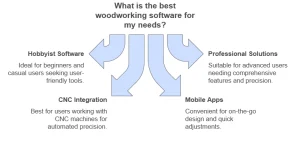
Top Software Picks For Hobbyists
Finding the right software for woodworking is important. Many options are both affordable and functional. Popular choices include SketchUp, Fusion 360, and Woodworking CAD. Each offers unique features to help with projects.
SketchUp is great for beginners. It has a user-friendly interface. Fusion 360 offers more advanced tools for detailed designs. Woodworking CAD is perfect for precise measurements.
Community support is essential for any software. Many forums and groups exist for users. They provide tips, tricks, and resources. Engaging with others can enhance your skills and knowledge.
Explore tutorials and online courses. These can help you understand the software better. Many resources are free and easy to access. Take advantage of these tools to improve your woodworking experience.
Professional Grade Solutions
Choosing professional-grade software for woodworking can greatly enhance your projects. Many programs offer advanced features tailored for complex designs. These features include 3D modeling, cutting lists, and material optimization.
Industry-standard software often includes tools for visualization and simulation. This allows users to see their designs before building. It helps prevent costly mistakes.
Some of the best options on the market are:
| Software Name | Key Features |
|---|---|
| SketchUp | 3D modeling, user-friendly interface |
| Fusion 360 | Advanced simulation, collaboration tools |
| Cabinet Vision | Cabinet design, manufacturing integration |
These tools can elevate your woodworking skills and make projects easier.
Integrating Software With Cnc Machines
Integrating software with CNC machines creates a smooth workflow. Designers can quickly move from concept to production. This process saves time and reduces errors.
Many software options offer CNC compatibility. They allow precise control over machinery. This feature ensures that projects turn out as planned.
Using design software with CNC machines enhances accuracy. It allows for detailed designs to be easily translated into reality. Overall, the right software improves both efficiency and quality in woodworking.
Mobile Apps For On-the-go Design
Mobile apps bring convenience to woodworking. They allow users to design anywhere. Quick sketches can be made on the go. Edits are simple and fast, saving valuable time.
Many apps offer great features for woodworkers. Users can access 3D modeling tools easily. This helps visualize projects better. Some apps even include cut lists for materials.
Real-time collaboration is possible with some apps. This allows teams to work together remotely. Sharing designs and ideas fosters creativity. These features make woodworking more accessible and enjoyable.
Future Of Woodworking Software
The future of woodworking software is bright. Trends are changing how woodworkers create. Innovations focus on ease of use and creativity. Advanced tools will help hobbyists and professionals alike. Cloud-based solutions are becoming more popular. These allow for easy access anywhere, anytime. Artificial Intelligence is also making waves in design. It helps users create custom plans quickly.
Virtual Reality will offer immersive experiences for training. Woodworkers can explore designs in a 3D space. Sustainability is another key area. Software will help track material usage and waste. This promotes eco-friendly practices in woodworking.
Collaboration tools will enable teamwork on projects. Users can share designs and ideas easily. The next generation of woodworking software will be exciting and innovative.
Frequently Asked Questions
What Software Do Professional Woodworkers Use?
Professional woodworkers often use software like SketchUp, AutoCAD, and Fusion 360. These programs help create detailed designs and 3D models. They enable precise measurements and adjustments, making woodworking projects more efficient. Choosing the right software depends on the specific needs of the project and the woodworker’s skill level.
Is There Free Woodworking Software Available?
Yes, several free woodworking software options exist, including SketchUp Free and FreeCAD. These tools offer essential features for designing and planning projects. While they may lack some advanced functionalities, they are suitable for hobbyists and beginners. These options can help you get started without financial investment.
How To Choose Woodworking Design Software?
To choose woodworking design software, consider your experience level and project needs. Look for user-friendly interfaces and essential features like 3D modeling. Also, check for compatibility with your computer system. Reading user reviews and trying out free trials can help determine the best fit for your woodworking style.
Can Woodworking Software Improve Project Efficiency?
Absolutely! Woodworking software enhances project efficiency by streamlining design and planning. It allows for quick adjustments and precise measurements, reducing errors. This leads to less material waste and faster completion times. Ultimately, using software can make your woodworking projects more organized and enjoyable.
Conclusion
Choosing the best software for woodworking can elevate your projects significantly. Consider your needs and skill level before making a decision. Whether you prefer design, planning, or project management tools, the right software can enhance your creativity and efficiency. Invest time in finding the ideal fit for your woodworking journey.