How to Charge a Saker Mini Chainsaw Battery (About 2 Hours)
A Saker mini chainsaw battery takes about 2 hours to charge on the charger that came with the saw, and Saker’s own listings say the indicator turns green when it is full. A red light does not mean the battery needs charging, as many guides claim; it is only reported as the charging light. This guide covers the steps, how to read the lights, the safe charging limits, and what to try when the battery will not charge.
How Do You Charge a Saker Mini Chainsaw Battery?
Best Two-Battery Saker Kit | |
 |
Saker Mini Chainsaw, 6 Inch Cordless with 2 Batteries, $56.99 The listing describes a 20V 1500mAh battery, and this kit ships with two. Since a full charge takes about 2 hours, a second pack means you can keep cutting while the first one sits on the charger.
|
As an Amazon Associate we earn from qualifying purchases. | |
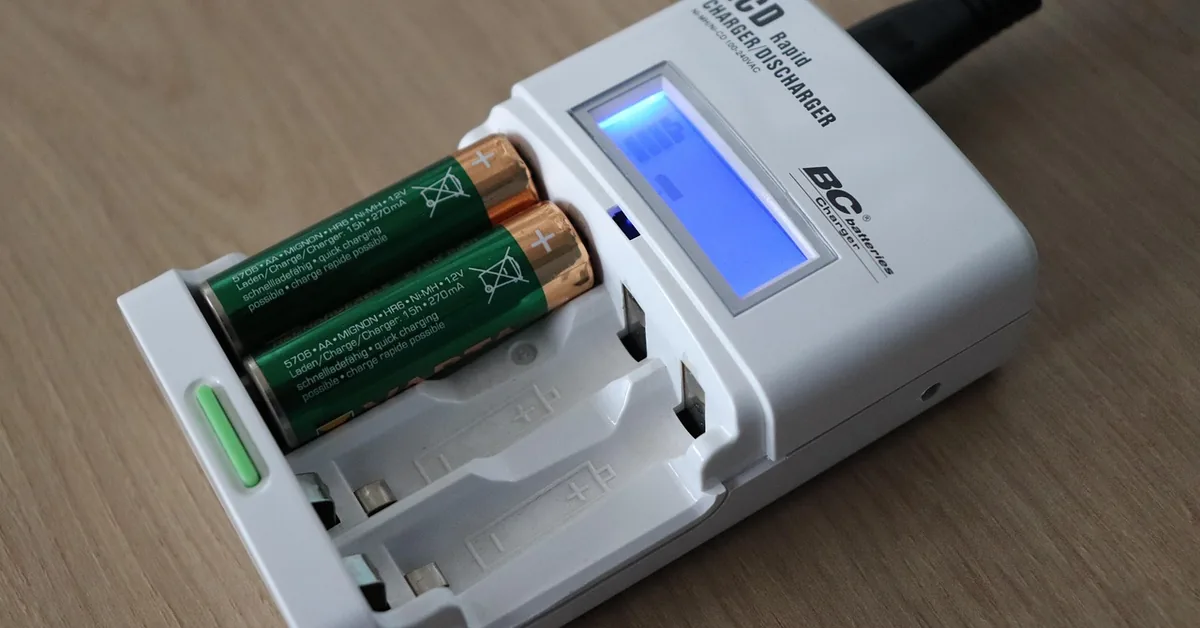
Charging is simple, but the order matters for safety. These steps combine what Saker says in its Amazon product listings with the charging rules in the New York State DHSES Lithium-Ion Battery Consumer Safety Guide, which repeats guidance from the U.S. Consumer Product Safety Commission. Your saw’s manual wins if it differs, because Saker sells several models (SK1804D and SK1806D both appear in its listings) and the charger design is not identical across them.
- Use the original charger: Saker’s listing says to charge only with the original charging adapter included with the product, because a non-original adapter could cause damage or safety risks.
- Check the temperature: The New York State guide says not to charge lithium-ion batteries below 32F (0C) or above 105F. A battery left in a cold truck or a hot shed should come back to room temperature first (our inference from that range).
- Plug directly into a wall outlet: The same guide says to plug in directly, not into a power strip, and to avoid overloading the outlet.
- Connect the battery to the charger: Seat the battery in the charger or adapter that shipped with the saw, following the picture in your manual.
- Watch the light: Green means fully charged according to Saker. Red while charging is what owners and most guides report, but the listings we read only state the green signal.
- Stay nearby for about 2 hours: Saker says a battery typically takes around 2 hours to charge fully. Do not leave it charging while you sleep or leave the house.
- Unplug once it is full: The New York State guide says to remove batteries as soon as they are fully charged, because unattended charging raises the chance of overcharging.
Saker’s listing also says to fully charge the battery before first use. If your saw arrived with a half-empty pack, top it off and wait for the green light before the first cut.
How Long Does a Saker Battery Take to Charge?
Saker says around 2 hours, and the pack is described as 20V and 1500mAh. The arithmetic below shows why charger current matters, and why a bigger number on a replacement charger is not a good thing.
| Charger current | Theoretical minimum for 1500mAh | What it means |
|---|---|---|
| 0.5 A | 3.0 hours (1.5 Ah divided by 0.5 A) | Slower than Saker’s stated time |
| 1 A | 1.5 hours (1.5 Ah divided by 1 A) | Close to Saker’s roughly 2 hours once charging tapers off |
| 2 A | 0.75 hours (1.5 Ah divided by 2 A) | Faster on paper, but not what the pack was designed for |
This is plain division, not a measured test, and real charging slows down near full, so the real figure runs longer. We do not know the exact current of Saker’s own charger, because the listings we read do not state it. One third-party 21V charger listing does state 1 amp output. The takeaway is that a faster charger is not an upgrade: the New York State DHSES Lithium-Ion Battery Consumer Safety Guide says that just because a charger fits your device does not mean it is safe to use.

If a charge seems to take far longer than 2 hours, the battery is probably worn or the outlet is bad. See the troubleshooting section below. For the saw’s own cutting limits, our guide on how to use a Saker mini chainsaw covers the cutting side.
What Do the Saker Charger Lights Mean?
Only one light signal is confirmed by Saker’s own listing: the indicator turns green when the battery is fully charged. Most owner guides add that red means charging, and that matches the usual rule of thumb, but we could not find it in a Saker document, so treat it as common reporting rather than a manufacturer statement.
| Light | What it means | Source |
|---|---|---|
| Green | Fully charged, remove the battery | Saker Amazon listing (B0947XLWFW) |
| Red | Charging in progress (not a request to charge) | Owner reports and secondary guides, not confirmed by Saker |
| No light at all | Nothing is reaching the charger or the battery is not seated | Troubleshooting below |
| Any other color or blinking | Not documented in anything we read; check your model’s manual | Unverified |
Correcting a common myth: several guides say a red light means the battery needs charging. The light describes the charger’s status, not the battery’s. A red light on the charger means it is working on the battery. We have not invented meanings for any other light pattern, because Saker does not publish them in the listings we read.
Can You Use a Different Charger on a Saker Battery?
Saker says no: use only the original adapter. A mismatched charger is a real risk with lithium packs, not a technicality. The New York State guide says that replacement batteries and chargers should be specifically designed and approved for your device, and that you should check the Consumer Product Safety Commission recall database at cpsc.gov/Recalls before buying.
“Just because a charger fits in your device doesn’t mean that it is safe to use.”
If your original charger is lost or dead, the practical order is: first, contact the seller through your Amazon order, since Saker’s listings promise to make things right within 24 hours. Second, look for a replacement made for your exact model. Third-party chargers are listed for the SK1804D with 100 to 240V input and 21V output, and some claim UL certification, but those are seller claims we have not verified. Before you plug one in, match the voltage, the plug and the model number.
- Match your model number (SK1804D, SK1806D) to the one the charger lists.
- Look for a certification mark on the charger itself, not only in the product text.
- Never use a charger just because the plug fits.
- Do not modify or take apart the battery or charger, which the New York State guide says significantly raises the risk of explosion.
Why Won’t My Saker Battery Charge?
Work through these in order, cheapest check first.
- Test the outlet. Plug in a lamp or phone charger. If it does not work, the problem is the outlet.
- Plug the charger directly into the wall. Skip the power strip and extension cord.
- Reseat the connection. Unplug the battery, look for dirt on the contacts, then push it fully into the charger.
- Check the battery temperature. If it is very hot from cutting or cold from storage, bring it to room temperature first. The 32F to 105F range comes from the New York State guide.
- Swap parts if you can. A second battery or a second charger shows which one has failed.
- Contact the seller. If the battery or charger is recent, use the warranty route before buying a replacement.
If the light stays red for many hours and the battery still will not run the saw, the pack is probably worn out, since lithium batteries lose capacity with age. We cannot give a cutoff time because Saker does not publish one, so treat several hours past the expected 2 as a sign to stop and replace it.

When to Stop Charging and Get Away From the Battery
Lithium-ion batteries can overheat into thermal runaway, which causes large, violent fires according to the New York State DHSES Lithium-Ion Battery Consumer Safety Guide. It is normal for a battery to get a little warm while charging, but these signs mean stop.
| Warning sign | What to do |
|---|---|
| Battery or charger feels extremely hot to the touch | Stop, unplug, move away from anything flammable |
| Swelling, bulging, lumps or leaking | Stop using it; do not charge it again |
| Hissing, cracking or popping sounds | Stop, unplug, leave the area |
| Strong or unusual smell | Stop, unplug, ventilate |
| Smoke | Get outside and call 9-1-1; do not try to put it out yourself |
The same guide says water may not prevent a lithium battery from burning and that fire extinguishers do not work on lithium-ion fires, so the safest move is to leave and call 9-1-1. A damaged or swollen battery should not go in household trash. The guide points to the Call2Recycle program for damaged, defective or recalled batteries.
Charge on a hard, clear surface with nothing flammable beside it, and keep sawdust, wood chips and rags away from the charger. Charging in the shop next to a pile of shavings is exactly what to avoid (our inference from the guide’s advice to charge away from liquids and clutter). If you are shopping for a different saw, see our handheld chainsaw comparison.
How to Store a Saker Battery Between Jobs
Saker’s listings give two storage rules: fully charge the battery before storing it for a long time, and avoid exposing it to extreme temperatures. Another listing adds that for long-term storage you should keep it fully charged and recharge it periodically.
This differs from what you will see elsewhere, including the earlier version of this page, which advised keeping the pack at partial charge. We follow the manufacturer here: full charge, then a periodic top-up. The New York State guide adds that batteries should be stored in a cool, dry place out of direct sunlight, at room temperature.
- Charge to green before putting the saw away for a season.
- Store the battery at room temperature, out of sun and damp.
- Top it up periodically; Saker does not give an interval, so a check every month or two is a reasonable habit (our suggestion).
- Inspect the case for cracks and the charger cord for wear.
If you are weighing how a cordless saw compares to gas, see battery vs gas chainsaw and whether battery chainsaws are any good. To pick a model, start with the best mini cordless chainsaws, and where the Saker mini chainsaw is made answers the common sourcing question.
Saker Battery Facts at a Glance
| Item | What the sources say |
|---|---|
| Battery rating | 20V, 1500mAh (Saker Amazon listings) |
| Charge time | Around 2 hours typically (Saker listing) |
| Full indicator | Turns green (Saker listing) |
| Battery weight | About 0.3 kg of the 1.1 kg saw (Saker listing) |
| Charging temperature range | 32F to 105F (New York State DHSES guide) |
| Charger rule | Original adapter only (Saker listing) |
| Cutting limits | Not recommended for hardwood logs or long heavy-duty cutting (Saker listing) |
FAQ
How long does it take to charge a Saker mini chainsaw battery?
About 2 hours. Saker’s listing says the battery typically takes around 2 hours to charge fully and should be charged completely before first use. Real charging slows near full, so a pack that is well past 2 hours may be worn.
What does the green light mean on a Saker charger?
Green means the battery is fully charged, according to Saker’s listing. Remove the battery and unplug the charger. The New York State guide says to remove batteries once they are fully charged instead of leaving them on the charger.
Can I use any 21V charger on a Saker battery?
No. Saker says to use only the original charging adapter, because non-original adapters could cause damage or safety risks. A charger that fits is not necessarily safe. If you must replace it, match the model number and voltage and look for a certification mark.
Why is my Saker battery not charging?
Check the outlet first, plug straight into the wall, reseat the battery and clean the contacts, and make sure the battery is at room temperature, between 32F and 105F. If a second battery or charger works, the first one has failed. Contact the seller before buying a replacement.
Can I leave a Saker battery charging overnight?
No. The New York State guide says never to leave lithium-ion devices charging unattended or while you sleep, because overcharging can cause overheating. Charge it while you are home and awake, and unplug it once the light turns green.
How should I store a Saker battery?
Fully charge it before long-term storage and recharge it periodically, as Saker’s listings say. Keep it at room temperature, away from direct sunlight and extreme heat or cold.
Conclusion
Charge with the original adapter, plug into the wall, wait for green, and unplug. If the battery gets hot, swells or smells, stop and move it away. For the cutting side of the saw, read how to use a Saker mini chainsaw.
Sponsored / affiliate links. As an Amazon Associate I earn from qualifying purchases. I may earn additional commission from eligible campaigns.