Your Guide to Choosing a Table Saw with Dado Capability
Hey there, fellow woodworker! If you’re like me, you’ve probably spent hours dreaming about the perfect table saw—one that can handle all your projects with precision and ease. A table saw with dado capability is a game-changer for anyone serious about woodworking. Whether you’re building cabinets, crafting furniture, or tackling shelving projects, the ability to cut clean, precise dadoes opens up a world of possibilities. I’ve spent years exploring table saws, testing their features, and diving into what makes a saw truly stand out.
In this guide, I’ll walk you through everything you need to know about choosing a table saw with dado capability, tailored for woodworkers in the USA. Let’s dive in and find the perfect tool for your shop!
What Is a Table Saw with Dado Capability?
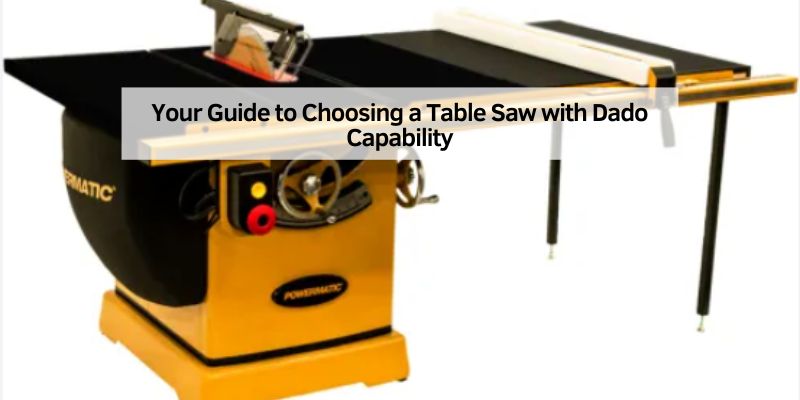
Let’s start with the basics. A table saw is the heart of any woodworking shop. It’s a powerful tool with a circular blade that protrudes through a flat table, letting you make precise cuts in wood, plywood, and other materials. But what makes a table saw with dado capability special? It’s all about the ability to use a dado stack—a set of blades and chippers that work together to cut wide, flat-bottomed grooves called dadoes. These grooves are perfect for joinery, shelving, and cabinetry, giving your projects a professional, sturdy finish.
Not all table saws can handle a dado stack. Some have short arbors (the shaft that holds the blade) or lack the power to drive a wide stack. A saw with dado capability has a long enough arbor and enough motor strength to spin a stack of blades safely. This feature is a must if you want to create strong joints or fit shelves into side panels without fuss. I remember the first time I cut a dado for a bookshelf—it was like magic watching the wood come together so perfectly!
Why Dado Capability Matters in Woodworking
You might be wondering, “Do I really need a table saw with dado capability?” Let me share my experience. Early in my woodworking journey, I tried cutting dadoes with a single blade, making multiple passes. It worked, but it was slow, and the results weren’t always clean. When I upgraded to a saw with dado capability, everything changed. A dado stack cuts a groove in one pass, saving time and ensuring a smooth, professional result.
Dadoes are essential for strong joinery. They let you slot one piece of wood into another, creating sturdy connections for cabinets, bookshelves, or drawer boxes. Without dado capability, you’d rely on routers or multiple blade passes, which can be less accurate and more time-consuming. For me, the ability to cut dadoes quickly and cleanly has been a lifesaver on projects with tight deadlines. Plus, it’s just satisfying to see those perfect grooves line up!
Key Features to Look for in a Table Saw with Dado Capability
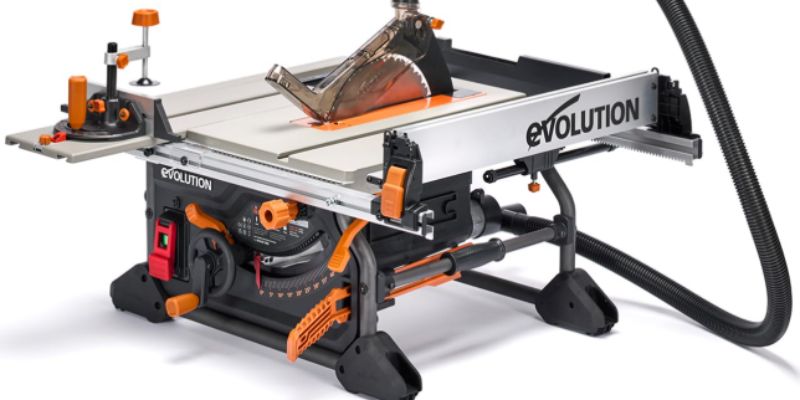
Choosing the right table saw can feel overwhelming with so many options out there. I’ve learned through trial and error what features matter most. Here’s what you should keep in mind when shopping for a table saw with dado capability:
- Arbor Length: The arbor needs to be long enough to hold a dado stack, typically up to 13/16 inches wide. A short arbor won’t safely secure the stack, which can be dangerous.
- Motor Power: Look for at least a 15-amp motor, preferably 2 horsepower or more. Cutting dadoes requires extra power, especially in hardwoods like oak or maple.
- Dado Throat Plate: Most saws need a special throat plate for dado stacks. Check if one is included or available for purchase.
- Rip Capacity: A larger rip capacity (at least 24 inches) gives you flexibility for wide boards or plywood sheets.
- Safety Features: A riving knife, blade guard, and anti-kickback pawls are non-negotiable. I’ve had close calls in the shop, and these features make all the difference.
- Fence System: A sturdy, easy-to-adjust fence (like a rack-and-pinion system) ensures accurate cuts every time.
- Dust Collection: Dado cuts create a lot of sawdust. A good dust port keeps your shop cleaner and safer.
I’ve found that a saw with these features balances power, precision, and safety. When I upgraded to a saw with a solid rack-and-pinion fence, my cuts became so much more consistent—it was like night and day!
Types of Table Saws with Dado Capability
Table saws come in different styles, each suited to specific needs. Here’s a breakdown of the main types that offer dado capability, along with their pros and cons:
| Type | Description | Pros | Cons |
|---|---|---|---|
| Jobsite Saws | Portable, lightweight saws designed for mobility. Often used on construction sites. | Easy to move, affordable, good for small shops or job sites. | Less powerful, smaller table size, limited rip capacity. |
| Contractor Saws | Heavier than jobsite saws, with more power and larger tables. Still portable. | Balanced power and portability, suitable for hobbyists. | Heavier, may require 220V power, less stable than cabinet saws. |
| Cabinet Saws | Heavy, stationary saws built for professional shops. High power and precision. | Powerful, large rip capacity, durable, ideal for heavy-duty projects. | Expensive, requires more space, often needs 220V power. |
| Hybrid Saws | A mix of contractor and cabinet saws, offering a middle ground. | Good power, more affordable than cabinet saws, suitable for small shops. | May lack the precision or durability of cabinet saws. |
When I started, I bought a jobsite saw because it fit my small garage and budget. It handled dadoes well for small projects, but when I moved to larger furniture builds, I upgraded to a hybrid saw for more power and stability. If you’re a hobbyist, a jobsite or contractor saw might be enough. Professionals or serious enthusiasts might want to invest in a cabinet or hybrid saw for long-term reliability.
Top Table Saws with Dado Capability for 2025
After testing and researching dozens of saws, I’ve narrowed down some of the best table saws with dado capability available in the USA. These are my top picks based on performance, features, and value:
DeWalt DWE7491RS Jobsite Table Saw
This saw is a favorite among hobbyists like me. Its 15-amp motor and 32.5-inch rip capacity make it versatile for most projects. It accepts an 8-inch dado stack up to 13/16 inches wide with a special throat plate. The rack-and-pinion fence is smooth and accurate, and the rolling stand makes it easy to move. I’ve used this saw for cabinetry and shelving, and it’s never let me down. It’s perfect if you’re working in a small space but need dado capability.
SawStop PCS31230-TGP252 Cabinet Table Saw
If safety is your top priority, SawStop is unbeatable. Its flesh-detection system stops the blade in milliseconds if it touches skin, saving fingers (and peace of mind). With a 3-horsepower motor and 30-inch rip capacity, it handles dado stacks like a champ. I was skeptical about the price at first, but after seeing it in action, I understood why it’s worth every penny for serious woodworkers.
SKIL SPT99-11 Heavy Duty Worm Drive Table Saw
This saw is a beast for the price. Its worm drive gearing delivers incredible torque, making dado cuts in hardwoods a breeze. It has a 30.5-inch rip capacity and accepts 8-inch dado stacks. The rack-and-pinion fence is precise, and the rolling stand is sturdy. I’ve used this for heavy-duty projects, and it’s held up beautifully.
Bosch 4100XC-10 Worksite Table Saw
Bosch is known for quality, and this saw delivers. With a 15-amp motor and 30-inch rip capacity, it’s great for dado cuts. It accepts 8-inch dado stacks and comes with a gravity-rise stand for easy setup. The fence is solid, and the soft-start motor reduces strain. I love how quiet and smooth this saw runs, even during tough cuts.
These saws cater to different budgets and needs, but all offer reliable dado capability. If you’re on a tight budget, the DeWalt or SKIL is a great start. If you’re ready to invest in a professional-grade tool, SawStop is the way to go.
How to Safely Use a Dado Stack on Your Table Saw
Safety is huge when using a table saw, especially with a dado stack. I’ve had a few close calls in my early days, so I can’t stress this enough: always prioritize safety. Here’s how to set up and use a dado stack safely:
- Check Compatibility: Make sure your saw’s manual confirms it can handle a dado stack. Never force a stack onto a short arbor—it’s a recipe for disaster.
- Use the Right Throat Plate: A standard throat plate is too narrow for a dado stack. Use the manufacturer’s dado throat plate or a custom one.
- Install the Dado Stack Properly: Stack the outer blades and chippers carefully, using shims for precise width. Tighten the arbor nut securely but don’t overdo it.
- Remove Safety Features Only When Necessary: The blade guard and riving knife often need to be removed for dado cuts. If so, lower the riving knife below the blade height and use extra caution.
- Wear Safety Gear: Always wear safety glasses and hearing protection. I also use a push stick to keep my hands far from the blade.
- Test on Scrap Wood: Before cutting your project piece, test the dado stack on scrap wood to ensure the width and depth are perfect.
- Feed Slowly and Steadily: Dado cuts require more power, so feed the wood slowly to avoid bogging down the motor or causing kickback.
I learned the hard way to double-check the arbor nut after a scary moment when it loosened during a cut. Take your time setting up, and you’ll avoid headaches (and potential injuries).
Benefits of Using a Dado Stack for Woodworking Projects
Using a dado stack has transformed how I approach woodworking. Here are some of the biggest benefits I’ve experienced:
- Time Savings: A dado stack cuts a groove in one pass, unlike multiple passes with a single blade. This is a huge time-saver for projects like cabinetry.
- Precision: Dado stacks create flat-bottomed grooves with clean edges, ensuring tight-fitting joints.
- Versatility: You can adjust the stack’s width with chippers and shims, making it perfect for everything from 1/4-inch grooves to 13/16-inch slots.
- Strength: Dado joints are incredibly strong, ideal for load-bearing shelves or furniture that needs to last.
When I built a set of kitchen cabinets, the dado stack made quick work of the grooves for the back panels. The result was sturdy, professional, and saved me hours compared to using a router.
Common Mistakes to Avoid When Using a Dado-Capable Table Saw
Even experienced woodworkers make mistakes. Here are some pitfalls I’ve encountered (or narrowly avoided) when using a dado stack:
- Using the Wrong Blade Size: Always use the dado stack size recommended by your saw’s manual (usually 6 or 8 inches). A 10-inch stack on a saw built for 8 inches is dangerous.
- Skipping Safety Gear: It’s tempting to skip goggles or push sticks, but don’t. I once had a chip fly into my face—thankfully, my glasses saved me.
- Incorrect Stack Setup: Misaligned chippers or loose shims can cause uneven cuts or vibration. Double-check your setup every time.
- Rushing the Cut: Feeding wood too fast can bog down the motor or cause kickback. Slow and steady wins the race.
- Neglecting Maintenance: A dull or dirty dado stack cuts poorly and strains the motor. Clean and sharpen your blades regularly.
Learning from these mistakes has made me a better woodworker. Take your time, and your projects will turn out safer and smoother.
Maintenance Tips for Your Table Saw and Dado Stack
Keeping your table saw and dado stack in top shape is key to great results. Here’s what I do to maintain mine:
- Clean Regularly: Sawdust builds up fast, especially with dado cuts. I use a shop vac and brush to clean the table, fence, and blade after every session.
- Check Alignment: A misaligned fence or blade can ruin your cuts. I check the fence and blade alignment monthly using a square and dial indicator.
- Sharpen Blades: A dull dado stack tears wood instead of cutting it. I send mine to a professional sharpener every few months, depending on use.
- Lubricate Moving Parts: A little dry lubricant on the fence rails and elevation gears keeps everything moving smoothly.
- Inspect the Arbor: A worn or damaged arbor can cause vibration. I check mine for wear every six months and replace it if needed.
I used to neglect cleaning until my saw started acting up. Now, I make maintenance a habit, and my cuts are cleaner and safer.
Budget Considerations for Dado-Capable Table Saws
Table saws with dado capability range from a few hundred to several thousand dollars. Here’s how I approach budgeting:
- Entry-Level ($300–$600): Jobsite saws like the DeWalt DWE7491RS or SKIL SPT99-11 are great for hobbyists. They’re affordable, portable, and handle dadoes well for small to medium projects.
- Mid-Range ($600–$1,200): Contractor or hybrid saws like the Bosch 4100XC-10 offer more power and larger rip capacities. These are ideal for serious hobbyists or small shops.
- Professional ($1,500+): Cabinet saws like the SawStop PCS31230-TGP252 are built for heavy use and precision. They’re a big investment but worth it for professionals.
Don’t forget to budget for a dado stack (around $100–$200 for a quality set) and a dado throat plate ($20–$50). When I bought my first saw, I didn’t account for these extras and had to wait a month to afford them. Plan ahead to avoid surprises!
Where to Buy a Table Saw with Dado Capability
You’ve got plenty of options for buying a table saw in the USA. Here’s where I’ve had the best luck:
- Home Depot and Lowe’s: Great for jobsite and contractor saws. They often have deals on DeWalt and SKIL models, and you can check them out in person.
- Amazon: Huge selection and competitive prices. I’ve bought accessories like dado stacks here, and fast shipping is a bonus.
- Specialty Retail: Stores like Rockler or Woodcraft carry high-end saws like SawStop and offer expert advice.
- Used Market: Check Craigslist or Facebook Marketplace for deals on used saws. I scored a great contractor saw this way, but always test it first and check the manual for dado compatibility.
Wherever you buy, read reviews and compare specs. I once bought a saw online without checking the arbor length—big mistake! Do your homework to avoid regrets.
Conclusion
Choosing a table saw with dado capability is one of the best decisions you can make for your woodworking projects. It’s like adding a superpower to your shop—suddenly, you can create strong, professional joints with ease. Whether you’re a beginner building your first bookshelf or a pro crafting custom cabinets, a dado-capable saw saves time, boosts precision, and opens up endless possibilities. From my years in the shop, I can tell you that investing in a quality saw with features like a long arbor, powerful motor, and solid fence system will pay off in every project.
Take your time to pick the right one, prioritize safety, and maintain your tools, and you’ll be amazed at what you can create. Now, go find that perfect saw and start cutting those flawless dadoes!
Frequently Asked Questions
What is a dado stack, and why do I need it?
A dado stack is a set of blades and chippers that work together to cut wide, flat-bottomed grooves called dadoes. You need it for strong joints in projects like cabinets or shelves. It cuts grooves in one pass, saving time and ensuring precision compared to multiple passes with a single blade.
Can all table saws use a dado stack?
No, not all table saws can use a dado stack. You need a saw with a long enough arbor and a powerful motor (usually 15 amps or more). Check the saw’s manual to confirm compatibility, as some jobsite saws have short arbors that can’t safely hold a dado stack.
How wide of a dado can I cut with a table saw?
Most table saws with dado capability can cut grooves up to 13/16 inches wide using an 8-inch dado stack. Some saws can handle wider stacks, but always check the manufacturer’s specs to avoid overloading the motor or arbor.
Is a dado-capable table saw safe to use?
Yes, if used properly. Always use a dado-specific throat plate, wear safety gear, and follow the manual’s instructions. Remove the blade guard only if necessary, and use a push stick to keep your hands clear. A saw with safety features like a riving knife and anti-kickback pawls adds extra protection.
Do I need a special throat plate for dado cuts?
Yes, most table saws require a wider throat plate for dado stacks because the stack is wider than a standard blade. Some saws include a dado throat plate, but you may need to buy one separately or make a custom insert for a perfect fit.