Black+Decker Circular Saw: BDECS300C Specs, Price & Models
Black+Decker’s BDECS300C is a 13-Amp, 7-1/4-inch corded circular saw with a built-in laser guide, priced around $66 — roughly half what a professional-grade saw costs. Skipping the laser recalibration check after a blade change is the most common reason DIYers report crooked cuts with this saw. This guide covers the current Black+Decker circular saw lineup, the BDECS300C’s real specs and price, how to change its blade safely, and how it stacks up against Skil’s competing 5080-01.
What Black+Decker Circular Saw Models Are Available Right Now?
Best Black+Decker Circular Saw Pick
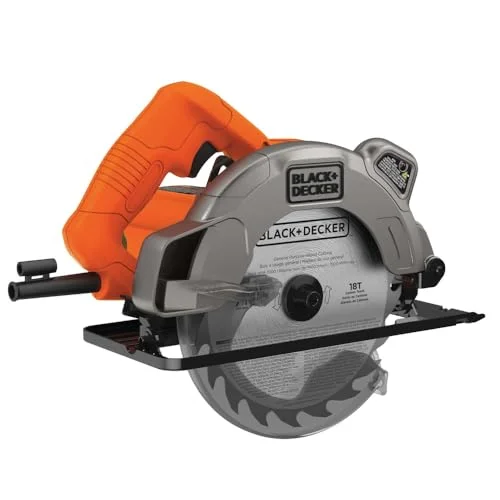 |
BLACK+DECKER BDECS300C 7-1/4″ Circular Saw with Laser – $66.19 Runs the same 13-Amp, 5,300 RPM motor and 2.5-inch cutting depth this guide breaks down above, plus the laser guide that helps beginners keep cuts straight.
|
Black+Decker currently sells two main circular saw types: the corded BDECS300C (7-1/4-inch, 13-Amp, laser guide) and the cordless BDCCS20B, a 20V MAX 5-1/2-inch saw sold as a bare tool that runs on the same battery platform as Black+Decker’s drills and other 20V tools. The corded BDECS300C is the better pick for a home workshop where you’re always near an outlet and want maximum cutting depth; the cordless BDCCS20B trades some power and blade size for portability on jobs away from a plug.

Both models cut wood, plastic, and composite decking cleanly with the stock blade. Neither is designed as a primary metal-cutting saw — see the FAQ below for what it takes to cut metal with either one.
BDECS300C Specs and Price (Full Breakdown)
According to Black+Decker’s own product page, the BDECS300C runs a 13-Amp motor at up to 5,300 RPM, cuts to a maximum depth of 2.5 inches at 90 degrees, bevels from 0-45 degrees, and weighs 9.4 pounds.
| Spec | BDECS300C |
|---|---|
| Motor | 13-Amp, up to 5,300 RPM |
| Blade diameter | 7-1/4 in |
| Max cutting depth (90°) | 2.5 in |
| Bevel range | 0-45° |
| Weight | 9.4 lb |
| Laser guide | Yes |
| Price (Amazon, checked live) | $66.19 |
📊 The BDECS300C spins its blade at up to 5,300 RPM and cuts a maximum depth of 2.5 inches at 90 degrees — Source: BLACK+DECKER official product page, 2026
How to Change the Blade on a Black+Decker Circular Saw
Changing the blade on the BDECS300C takes about two minutes using the saw’s built-in spindle lock — no separate wrench-holding trick required. Follow these steps in order:
- Unplug the saw: Disconnect it from power completely before touching the blade.
- Engage the spindle lock: Press and hold the spindle lock button to stop the arbor from turning.
- Loosen the arbor bolt: Use the included wrench to turn the bolt counterclockwise while the lock is engaged.
- Remove the outer clamp washer and old blade: Note which way the teeth point before sliding the blade off.
- Install the new blade: Match the blade’s rotation arrow to the saw’s rotation direction.
- Re-tighten and recheck the laser: Tighten the arbor bolt, then make a test cut on scrap wood to confirm the laser guide still lines up with the blade — this is the step most buyers skip, and it’s why complaints about “crooked cuts” usually trace back to an unchecked laser after a blade swap, not a saw defect.

Black+Decker vs Skil: Which 13-Amp Circular Saw Should You Buy?
The BDECS300C’s closest direct competitor is Skil’s 5080-01, another 13-Amp, 7-1/4-inch corded saw in the same price range. The main practical differences: Black+Decker adds a laser cut-line guide that Skil’s 5080-01 doesn’t have, while Skil adds an integrated dust blower to keep the cut line visible without the laser.
| Feature | Black+Decker BDECS300C | Skil 5080-01 |
|---|---|---|
| Motor | 13A, 5,300 RPM | 13A / 2.3HP, 5,300 RPM |
| Max cut depth (90°) | 2.5 in | 2-7/16 in |
| Bevel range | 0-45° | Up to 51°, positive stop at 45° |
| Guide system | Laser cut-line guide | Integrated dust blower (no laser) |
| Best for | Beginners who want a visible cut line | Users who want a slightly wider bevel range |
Common Mistakes When Using a Black+Decker Circular Saw
- Trusting the laser without checking it: The laser guide can shift out of alignment after a blade change or a drop — always make a test cut on scrap before trusting it on a real cutline.
- Setting the cutting depth too deep: Set the blade to extend only about 1/4 inch below the material — a deeper setting increases kickback risk and blade wear for no cutting benefit.
- Forcing the saw through the cut: Let the 13-Amp motor do the work; pushing too hard bogs down the motor and can cause the blade to bind.
- Using the stock blade on the wrong material: The included 18-tooth carbide blade is a general-purpose wood blade — swap to a fine-tooth plywood blade for splinter-free cuts on veneered panels.
If you’re choosing a blade for a specific material, our plywood blade guide covers tooth counts and blade types in more depth. For a broader look at what different saw types cost, see our saw pricing breakdown, and if you’re deciding between a circular saw and a table saw for a specific job, our Black+Decker table saw guide covers that comparison.
Frequently Asked Questions
What’s the difference between a jigsaw and a circular saw?
A jigsaw uses a thin reciprocating (up-and-down) blade for curved and detail cuts, while a circular saw spins a round toothed blade for fast, straight rip and cross cuts. For straight cuts in plywood or dimensional lumber, a circular saw like the BDECS300C is faster and leaves a cleaner edge.
Can a Black+Decker circular saw cut metal?
Only with the right blade. The stock 18-tooth carbide wood blade that ships with the BDECS300C is not rated for metal. Swapping in a metal-cutting abrasive or carbide-tipped blade rated for the saw’s arbor size lets it cut thin sheet metal, but it will not replace a dedicated metal-cutting saw for anything thicker.
How do you change the blade on a Black+Decker circular saw?
Unplug the saw, press the spindle lock to stop the arbor from spinning, then use the included wrench to loosen the arbor bolt counterclockwise. Remove the outer clamp washer and old blade, fit the new blade with the teeth facing the same rotation direction, then re-tighten. See the full step-by-step above.
Is the Black+Decker BDECS300C good enough for professional use?
It’s built and priced for DIY and occasional use, not daily job-site work. At 9.4 pounds with a 13-Amp brushed motor, it handles home projects and light framing fine, but reviewers consistently recommend it for beginners over professionals who need all-day durability.
For most home workshops, the BDECS300C’s laser guide and 2.5-inch cutting depth cover everything from framing lumber to plywood sheets — just budget two minutes to recheck the laser every time you swap blades.
Sponsored / affiliate links. As an Amazon Associate I earn from qualifying purchases. I may earn additional commission from eligible campaigns.
 BLACK+DECKER Circular Saw 20V MAX, 6-1/2 in. Brushless Circular Saw Cordless Kit with 2.5Ah Battery and Charger, 24T Blade for Wood, Up to 165 Cuts Per Charge, LED Light, PowerConnect (BLCS78E1)
 Hoteche 7-1/4-Inch Circular Saw Blade for Wood 24-Tooth Tungsten Carbide-Tipped Blade High-Performance Professioal Saw Blade for Circular Saws and Miter Saws, Rhombus Hole Size 5/8-inch