Can A Cricut Cut Wood What to Know
Many crafters wonder, “Can a Cricut Cut Wood? What to Know” is a question that pops up a lot, especially for those new to using their cutting machines for different materials. It can seem a little tricky at first, but don’t worry!
We’ll walk through everything you need to know in a simple, easy-to-follow way. Get ready to explore how your Cricut can handle wood projects.
The short answer to “Can a Cricut Cut Wood? What to Know” is yes, but with some important specifics. Not all Cricut machines are created equal when it comes to cutting thicker materials like wood.
The type of Cricut machine you have, the specific blade you use, and the type of wood all play a big role in whether your project will be successful. It’s not as simple as just placing a piece of wood on the mat and hitting ‘go’. There are specific settings and techniques you need to master.
Understanding the limitations and capabilities of your Cricut machine is key. For beginners, the idea of cutting wood with a machine typically associated with paper and vinyl can be a bit confusing. This guide breaks down exactly what you need to consider.
We’ll cover the types of wood that work best, the essential tools you’ll need, and the step-by-step process to get those perfect wood cuts. You’ll learn what makes certain woods suitable and why others are a definite no-go. We’ll also look at how different Cricut models perform and what accessories can make the job easier.
Cricut Machines Capable of Cutting Wood
When asking “Can a Cricut Cut Wood? What to Know,” the first thing to consider is which Cricut machines can actually handle this task. Not all models have the power or the blade housing to cut through wood effectively.
- Cricut Maker Models: These are the champions for cutting wood. The Cricut Maker, Cricut Maker 3, and older Maker models are designed with a stronger motor and the Adaptive Tool System. This system allows them to use specialized blades, including the Knife Blade, which is essential for cutting wood. The Adaptive Tool system intelligently controls the direction of the blade and the pressure applied, making precise cuts possible.
- Cricut Explore Models: Generally, Cricut Explore Air 2 and Explore Air 3 are NOT recommended for cutting wood. Their motors are not powerful enough to cut through wood, even thin balsa wood. They are primarily designed for lighter materials like paper, cardstock, vinyl, and iron-on. Attempting to cut wood with an Explore machine will likely result in a dull blade, damaged mat, and incomplete cuts.
The Essential Tool The Knife Blade
To successfully cut wood with your Cricut, the right tool is absolutely critical. For most wood types, you will need the Knife Blade. This blade is specifically designed to cut through thicker and denser materials that standard blades cannot handle.
- What is the Knife Blade: The Cricut Knife Blade is a deep-cut blade that uses a thicker, more robust blade. It’s housed in a special clamp (Clamp B) that works with the Adaptive Tool System on Cricut Maker machines.
- How it Works: The Knife Blade moves back and forth, cutting incrementally through the material. This process is slower than cutting with a standard blade but allows for much deeper penetration. The machine makes multiple passes over the cut line, gradually cutting through the wood.
- Important Note: The Knife Blade is ONLY compatible with Cricut Maker machines. It will not work with Cricut Explore models.
Types of Wood You Can Cut
So, “Can a Cricut Cut Wood? What to Know” also depends heavily on the type of wood you’re working with. Not all wood is created equal, and some are much easier for a Cricut Maker to cut than others.
- Balsa Wood: This is the most common and easiest wood to cut with a Cricut Maker and Knife Blade. It’s a very lightweight and soft wood. You can typically cut up to 3/32 inch (2.4 mm) thick balsa wood. It’s perfect for models, small crafts, and detailed decorative elements.
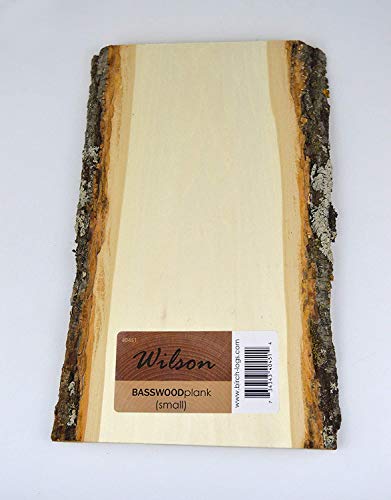
- Basswood: Basswood is also a popular choice for Cricut wood projects. It’s a bit denser and harder than balsa wood but still manageable. You can usually cut up to 1/16 inch (1.6 mm) thick basswood with the Knife Blade. It’s a good option for slightly more durable projects.
- Veneer Wood Sheets: Some thin veneer wood sheets can also be cut. These are very thin layers of real wood. The thickness will be the most important factor here, aiming for 1/16 inch or less.
Woods You Cannot Cut:
- Plywood: Even thin plywood is generally too dense and hard for the Cricut Maker and Knife Blade. The blade can dull quickly, and the motor may struggle.
- Hardwoods: Any type of hardwood, such as oak, maple, or walnut, is far too dense and thick to be cut by a Cricut machine.
- Wood Thicker Than Recommended: Exceeding the recommended thickness for balsa or basswood will lead to poor results and potential damage to your machine or blade.
Preparing Your Wood for Cutting
Proper preparation is a major part of the answer to “Can a Cricut Cut Wood? What to Know.” Getting your wood ready ensures a cleaner cut and protects your Cricut machine.
- Smoothness: Ensure your wood is smooth and free of any splinters or rough edges. You might need to lightly sand it beforehand.
- Flatness: The wood must be perfectly flat. Any warping or bending will prevent a clean cut and can cause the blade to miss spots.
- Adhesion: This is incredibly important. You need to secure the wood to your cutting mat so it doesn’t move during the multiple passes of the Knife Blade. Use a strong grip cutting mat, and consider using painter’s tape or Cricut’s Strong Grip tape around the edges of the wood to hold it firmly in place.
- Placement: Place your wood precisely on your mat. Double-check that it’s aligned with where your design will be cut in Design Space.
Cricut Design Space Settings for Wood
The software you use, Cricut Design Space, has specific settings for different materials. For wood, these settings are crucial for success.
- Material Selection: In Design Space, you’ll need to select the exact type of wood you are using (e.g., Balsa Wood, Basswood).
- Blade Type: Make sure you have selected the Knife Blade as your cutting tool.
- Pressure and Passes: Design Space will automatically suggest pressure settings and the number of passes the blade will make. For thicker materials, it will recommend multiple passes. Do NOT change these settings unless you are very experienced and know what you are doing. Let the software guide you.
- Test Cuts: It’s always a good idea to do a small test cut on a scrap piece of your wood before cutting your main design. This helps you confirm the settings are correct and that your wood is adhering properly.
Step-By-Step Wood Cutting Process
Here’s a simplified guide to cutting wood with your Cricut Maker. This addresses the core of “Can a Cricut Cut Wood? What to Know” by showing you how.
- Design Your Project: Create or upload your design in Cricut Design Space. Make sure the size and complexity are suitable for wood cutting. Simple shapes and designs work best for beginners.
- Prepare Your Wood: Ensure your wood is smooth, flat, and ready.
- Load the Mat: Place your wood onto a strong grip cutting mat, ensuring it’s very secure. Use additional tape around the edges if needed.
- Insert the Knife Blade: Install the Knife Blade into Clamp B on your Cricut Maker.
- Load the Mat into the Machine: Follow the on-screen prompts in Design Space to load your mat.
- Start the Cut: Once Design Space confirms everything is ready, press the flashing ‘C’ button to start the cutting process. The machine will make multiple passes.
- Unload and Inspect: When the cut is complete, unload the mat. Carefully check if the wood has been cut all the way through. If not, you can try re-loading the mat and running the cut again (ensure the design is aligned perfectly). Sometimes, minor touch-ups with a craft knife or sandpaper are needed.
- Remove the Wood: Gently peel or lift the cut wood pieces from the mat.
Troubleshooting Common Wood Cutting Issues
Even with careful preparation, you might run into problems. Here are some common issues and how to fix them when trying to figure out “Can a Cricut Cut Wood? What to Know.”
- Incomplete Cuts:
- Cause: Wood not flat, mat not sticky enough, incorrect settings, wood too thick or dense.
- Solution: Ensure wood is perfectly flat and well-adhered. Use a new strong grip mat. Double-check material settings and try another pass. If the wood is too thick, you’ll need to find a thinner piece or a different material.
- Blade Dulled Quickly:
- Cause: Attempting to cut wood that is too hard or dense, or exceeding the recommended thickness.
- Solution: Only use recommended wood types and thicknesses. The Knife Blade is a consumable item and will need replacing eventually.
- Wood Warping During Cut:
- Cause: Too much pressure from the blade on certain passes, or the wood was not secured evenly.
- Solution: Ensure the wood is taped down securely all around its edges. Check that the mat is also firmly attached to the machine.
- Jagged or Rough Edges:
- Cause: Blade needs replacing, wood quality, or insufficient adhesion.
- Solution: Use a sharp Knife Blade. Try a higher quality wood. Ensure the wood is clamped down very tightly. Lightly sanding after cutting can also help.
Safety First When Cutting Wood
Working with cutting machines and materials like wood requires attention to safety. Knowing how to stay safe is part of the “Can a Cricut Cut Wood? What to Know” discussion.
- Supervision: Always supervise children when they are using or near the Cricut machine, especially when cutting wood.
- Blade Handling: The Knife Blade is very sharp. Handle it with care. Keep it in its protective cover when not in use and when storing it.
- Machine Operation: Do not reach into the machine while it is in operation. Keep fingers and loose clothing away from moving parts.
- Ventilation: While wood itself doesn’t produce harmful fumes when cut, it’s always good practice to work in a well-ventilated area, especially if you are sanding the wood.
Alternatives to Wood Cutting on Cricut
If your Cricut machine isn’t a Maker or if you’re looking for other options, there are alternatives to consider when you’re thinking about “Can a Cricut Cut Wood? What to Know.”
- Scoring Tools: For very thin wood or to create score lines on wood, you might be able to use a scoring tool with a Cricut Maker. However, this is not for cutting through.
- Laser Cutters: For more advanced or intricate wood cutting, professional laser cutters offer incredible precision and can handle a much wider variety of wood types and thicknesses.
- Hand Tools: For simple projects, traditional hand tools like a craft knife, balsa stripper, or scroll saw can be used for cutting wood.
- Pre-Cut Wood Pieces: Many craft stores sell pre-cut wooden shapes, letters, and numbers that you can then decorate with your Cricut-cut vinyl or paint.

Frequently Asked Questions
Question: Can a Cricut Explore Air 2 cut wood?
Answer: No, the Cricut Explore Air 2 is not powerful enough to cut wood. It is designed for lighter materials like paper, vinyl, and cardstock. You would need a Cricut Maker model with the Knife Blade for wood cutting.
Question: What is the thinnest wood I can cut with my Cricut Maker?
Answer: You can cut very thin wood, such as 1/16 inch (1.6 mm) or thinner veneer sheets. For standard wood types like balsa, up to 3/32 inch (2.4 mm) is generally the maximum, but it depends on the wood’s density and your machine’s condition.
Question: Do I need to tape my wood to the mat?
Answer: Yes, it is highly recommended to tape down the edges of your wood to the mat. This prevents the wood from shifting or lifting during the multiple cutting passes, ensuring a cleaner and more accurate cut.
Question: How long does a Cricut Knife Blade last when cutting wood?
Answer: The lifespan of a Knife Blade varies greatly depending on the type of wood cut, the thickness, and the number of projects. For wood, expect it to dull faster than when cutting paper. It’s a consumable part and will need replacement over time.
Question: Can I cut painted or stained wood with my Cricut Maker?
Answer: It is generally not recommended to cut painted or stained wood. The paint or stain can gum up the blade, make the surface uneven, and cause adhesion problems. It’s best to cut unfinished wood and then paint or stain it after cutting.
Final Thoughts
Exploring the possibility of cutting wood with your Cricut machine opens up a whole new world of crafting projects. The key takeaway is that while it is indeed possible, it requires the right tools, specifically a Cricut Maker and the Knife Blade, along with the correct type and thickness of wood. Balsa wood and thin basswood are your best friends for successful cuts.
Preparation, including ensuring your wood is smooth, flat, and extremely well-adhered to a strong grip mat, is absolutely essential. Following the precise settings in Cricut Design Space and letting the machine do its multiple passes is crucial for achieving clean results. Remember to be patient, as wood cutting is a slower process than cutting paper or vinyl.
Don’t be discouraged if your first attempt isn’t perfect; troubleshooting common issues like incomplete cuts or rough edges is part of the learning curve. Always prioritize safety by handling the sharp Knife Blade with care and keeping your workspace clear. With the right approach, you can confidently create beautiful wood elements for your crafts.