Delta Table Saw Switch Replacement: A Step-by-Step Guide for Woodworkers
Hey there, fellow woodworker! If you’re reading this, chances are your Delta table saw’s switch has given up on you, or maybe it’s acting finicky, and you’re ready to roll up your sleeves and fix it. I’ve been there—my trusty Delta saw started acting like it had a mind of its own, turning on unexpectedly or refusing to shut off. It was frustrating, but replacing the switch turned out to be a straightforward fix that saved me time and money. In this article, I’m going to walk you through everything you need to know about replacing a Delta table saw switch.
From picking the right replacement part to installing it safely, I’ve got you covered with practical tips based on my own experience. Whether you’re a seasoned woodworker or just starting out, this guide is designed to make the process easy and stress-free. Let’s dive in and get that saw running smoothly again!
Why a Table Saw Switch Matters
Your table saw’s switch is like the heartbeat of the machine. It controls the power, turning the saw on and off, and ensures safe operation. A faulty switch can be more than just an annoyance—it’s a safety hazard. I learned this the hard way when my Delta saw’s switch started sticking, making it hard to shut off quickly. A good switch should be responsive, reliable, and easy to access in an emergency.
Switches wear out over time due to constant use, dust buildup, or electrical arcing. Arcing happens when the electrical current jumps across the switch’s contacts, causing them to burn out. I noticed my switch was sparking a bit before it failed completely, which was a clear sign it needed replacing. If your saw won’t turn on, stays on when you don’t want it to, or smells like burnt plastic, it’s time to act. Replacing the switch not only restores functionality but also keeps you safe in the workshop.
Signs Your Delta Table Saw Switch Needs Replacement
Before you grab your tools, let’s make sure the switch is the problem. I’ve seen plenty of woodworkers assume their motor is shot when it’s just the switch acting up. Here are the telltale signs I look for:
- The saw won’t turn on: You flip the switch, and nothing happens. This could mean the switch’s contacts are worn out or broken.
- The saw won’t turn off: This is what happened to me—my saw kept running even after I flipped the switch off, which is dangerous.
- Intermittent power: If the saw cuts in and out during use, the switch might be failing to maintain a steady connection.
- Burn marks or strange smells: A burning smell or visible scorch marks around the switch housing is a red flag for electrical issues.
- Physical damage: If the switch feels loose, wobbly, or the paddle is cracked, it’s time for a replacement.
If you’re seeing any of these, don’t wait. A bad switch can lead to accidents or damage your saw’s motor. I once ignored a sticky switch, thinking I could “deal with it,” and ended up with a near-miss when the saw didn’t shut off as expected. Lesson learned!
Choosing the Right Replacement Switch for Your Delta Table Saw
Picking the right switch is critical. I made the mistake of ordering a generic switch once, only to find it didn’t fit my Delta saw’s housing. Here’s what you need to know to avoid my blunder:
First, check your saw’s model number. Delta table saws, like the 36-725, 34-444, or Unisaw models, often use specific switches. You can find the model number on a plate near the motor or on the saw’s body. Mine was a 36-979, and I had to double-check to ensure compatibility.
Next, look at the switch’s specifications:
- Voltage and amperage: Most Delta saws run on 120V or 240V, with motors drawing 12-18 amps. Make sure the replacement switch matches or exceeds these ratings. For example, my saw’s motor was 15 amps at 120V, so I needed a switch rated for at least that.
- Switch type: Delta saws typically use toggle or paddle switches. Paddle switches are safer because they’re easier to hit in an emergency. I prefer paddle switches for their big, easy-to-smack “off” button.
- Compatibility: Some switches are universal, like the SW7A or SW7B, which fit many Delta models. Check sites like Amazon or Fix.com for parts labeled with part numbers like 489105-00 or 438010170141.
You can buy OEM (original equipment manufacturer) switches from Delta or aftermarket options from brands like Ryobi or Grizzly. I went with an aftermarket paddle switch from Grizzly because it was cheaper and had great reviews. Just make sure the switch fits your saw’s housing and has the same number of terminals (usually four).
Here’s a quick comparison table to help you choose:
| Switch Type | Pros | Cons | Best For |
|---|---|---|---|
| OEM Delta Switch | Perfect fit, reliable | Expensive, sometimes discontinued | Exact replacements |
| Aftermarket Toggle | Affordable, widely available | May need minor modifications | Budget-conscious users |
| Paddle Switch | Safe, easy to turn off | Slightly bulkier | Safety-focused workshops |
If you’re unsure, take your old switch to a hardware store like Grainger. I did this and found a rocker switch for under $10 that worked like a charm after a bit of tweaking.
Tools and Materials You’ll Need
Before you start, gather your tools. I like to have everything ready so I’m not scrambling mid-project. Here’s what I used:
- Screwdriver (Phillips and flathead)
- Needle-nose pliers
- Wire cutters/strippers
- Multimeter (for testing continuity)
- Replacement switch (check compatibility)
- Electrical tape
- Marker or label maker (to mark wires)
- Safety gloves and glasses
You might also need a new switch housing if yours is damaged. I found mine cracked after years of use, so I ordered a new one online. Double-check that you have a clean workspace and a power source you can safely unplug.
Safety First: Preparing for the Replacement
I can’t stress this enough: safety comes first. Working with electrical components is no joke. Here’s how I prep to stay safe:
- Unplug the saw: Always disconnect the power cord from the outlet. I tape the plug to the table to remind myself it’s off.
- Wear protective gear: Gloves and safety glasses protect you from sharp edges or accidental sparks.
- Check for power: Use a multimeter to confirm there’s no electricity running through the saw. I learned this trick after a friend got a mild shock from a “dead” machine.
- Clear the area: Move sawdust, tools, and distractions away from your workspace.
I also like to take a quick picture of the switch wiring before I start. It’s a lifesaver when you’re reconnecting wires later.
Step-by-Step Guide to Replacing the Switch
Now, let’s get to the fun part—replacing the switch. I’ve done this a couple of times, and it’s easier than it looks. Follow these steps, and you’ll have your saw back in action:
Step 1: Remove the Old Switch
- Locate the switch housing on your saw. It’s usually on the front or side of the machine.
- Use a screwdriver to remove the screws holding the switch assembly in place. On my Delta, it was three screws on the back cover.
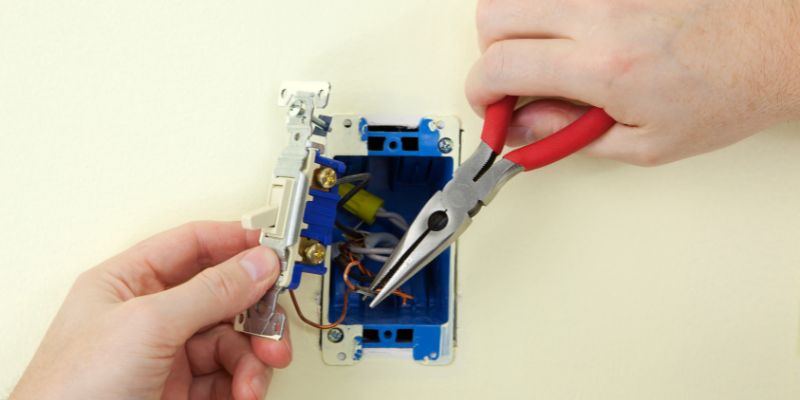
- Gently pull the switch out. You’ll see wires connected to terminals—don’t yank them!
- Take a photo or label the wires (e.g., “black top,” “white bottom”). This saved me from confusion later.
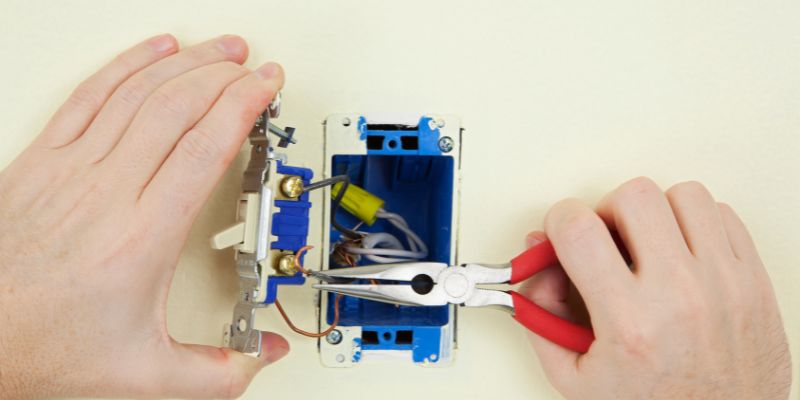
- Disconnect the wires by squeezing the sides of the switch or using needle-nose pliers to pull them off the terminals.
Step 2: Inspect the Wiring and Housing
- Check the wires for damage. I found one of mine was frayed, so I trimmed it and re-stripped the end.
- Look at the switch housing. If it’s cracked or melted, replace it. I ordered a new one from Fix.com for about $15.
- Use a multimeter to test the old switch for continuity. If it doesn’t show continuity when flipped on, it’s definitely bad.
Step 3: Install the New Switch
- Compare the new switch to the old one to ensure the terminals match. My aftermarket switch had the same four-terminal setup.
- Attach the wires to the new switch, following your photo or labels. For my saw, I connected black wires to the top and bottom terminals on one side and white wires to the other side.
- Secure the wires with electrical tape if they feel loose.
- Snap or screw the new switch into the housing. I had to file down a small edge on my aftermarket switch to make it fit snugly.
Step 4: Reassemble and Test
- Reattach the switch assembly to the saw with the screws.
- Plug the saw back in and flip the switch. Mine fired up perfectly, and I felt like a hero!
- Test the on/off function several times. If it’s sticky or doesn’t work, double-check the wiring.
If the saw still doesn’t work, the issue might be deeper, like a bad motor or capacitor. I had to replace a capacitor once, but that’s a story for another day.
Common Challenges and How to Overcome Them
I hit a few snags when replacing my switch, so let me share some tips to save you headaches:
- Switch doesn’t fit: If the new switch is too big or small, you might need to modify the housing or order a different model. I filed down a plastic edge to make mine fit.
- Wiring confusion: If you didn’t label the wires, check your saw’s manual or look up a wiring diagram online. Delta’s website has some diagrams, or try forums like WoodworkingTalk.
- Discontinued parts: Some Delta switches are hard to find. I used a universal switch from Grizzly, which worked after minor tweaks.
- Arcing issues: If your new switch sparks, it might be underrated for your saw’s motor. Double-check the amp rating.
If you’re still stuck, local tool repair shops can help. I took my switch to a Dewalt repair center once, and they found a compatible part in minutes.
Maintaining Your Table Saw Switch for Longevity
Once your new switch is installed, you’ll want to keep it in good shape. Here’s what I do to extend its life:
- Keep it clean: Sawdust can creep into the switch housing and cause issues. I blow out dust with compressed air every few months.
- Check connections: Loose wires can lead to arcing. I tighten the terminals annually.
- Avoid overloading: Using the right extension cord (heavy-duty, under 25 feet for 120V saws) prevents strain on the switch.
- Inspect regularly: I check my switch for wear every six months, especially after heavy use.
These habits have kept my saw running smoothly for years, and I haven’t had to replace the switch again since my last fix.
Where to Find Replacement Switches
Finding the right switch can feel like a treasure hunt, but here are my go-to sources:
- Online retailers: Amazon, Fix.com, and eReplacementParts.com have OEM and aftermarket switches. I found my SW7A switch on Amazon for about $20.
- Delta’s official site: Check deltamachineryparts.com for OEM parts, though they’re pricier.
- Local hardware stores: Grainger or Ace Hardware often stock universal switches.
- Woodworking forums: Sites like LumberJocks or Reddit’s r/woodworking have members selling or recommending parts.
Always read reviews to ensure the switch is reliable. I learned to avoid brands like Kedu after reading about their high failure rates on forums.
Why I Love My Delta Table Saw (Even When It Breaks)
Despite the occasional hiccup, my Delta table saw is a workhorse. It’s precise, powerful, and built to last. Replacing the switch was a small price to pay for keeping it in my shop. Fixing it myself gave me a sense of pride and saved me from buying a new saw. Plus, it’s a chance to learn more about your machine and make it safer.
Conclusion
Replacing a Delta table saw switch might sound daunting, but it’s a project any woodworker can tackle with the right tools and know-how. I’ve been through the process, and I can tell you it’s rewarding to bring your saw back to life. By choosing the right switch, following safety steps, and taking your time with the wiring, you’ll have your saw humming along in no time. It’s not just about fixing a tool—it’s about keeping your workshop safe and productive. So, grab that screwdriver, pick out a reliable switch, and get back to creating beautiful woodworking projects. You’ve got this, and I’m cheering you on from my own dusty workshop!
Frequently Asked Questions
What causes a Delta table saw switch to fail?
Switches fail due to wear and tear, dust buildup, or electrical arcing. Constant use can wear out the internal contacts, and sawdust can jam the mechanism. Arcing happens when the current jumps across contacts, burning them out. I noticed my switch started sparking before it died completely.
Can I use a household light switch for my Delta table saw?
You can, but I don’t recommend it. Household switches aren’t rated for the high amperage of a table saw motor, which can lead to overheating or failure. I tried this once on a bandsaw and ended up replacing it again within a year. Stick to a switch rated for your saw’s voltage and amps.
How do I know if my Delta switch is compatible with my saw?
Check your saw’s model number and the switch’s voltage and amperage ratings. Look for part numbers like 489105-00 or check compatibility lists on sites like Fix.com. I always cross-reference with my manual or online forums to be sure.
Is it safe to replace the switch myself?
Yes, if you follow safety steps. Unplug the saw, wear gloves and glasses, and use a multimeter to check for power. I’ve done it a few times without issues, but if you’re unsure about wiring, consult a professional electrician.
Where can I find a wiring diagram for my Delta table saw?
Check your saw’s manual or Delta’s official website. I also found helpful diagrams on WoodworkingTalk and Reddit’s woodworking community. If you’re stuck, take a photo of the wiring before disconnecting to use as a guide.
How long does it take to replace a Delta table saw switch?
It took me about 30-45 minutes, including setup and testing. If you’re new to it, budget an hour to go slow and double-check everything. Having tools and a new switch ready speeds things up.
Can a bad switch damage my table saw’s motor?
Yes, a faulty switch can cause the motor to overheat or run intermittently, which can strain it. I caught my switch issue early, so my motor was fine, but ignoring it could lead to bigger repairs. Fix the switch as soon as you notice problems.