How to Charge Craftsman V20 Battery: Step-by-Step Guide
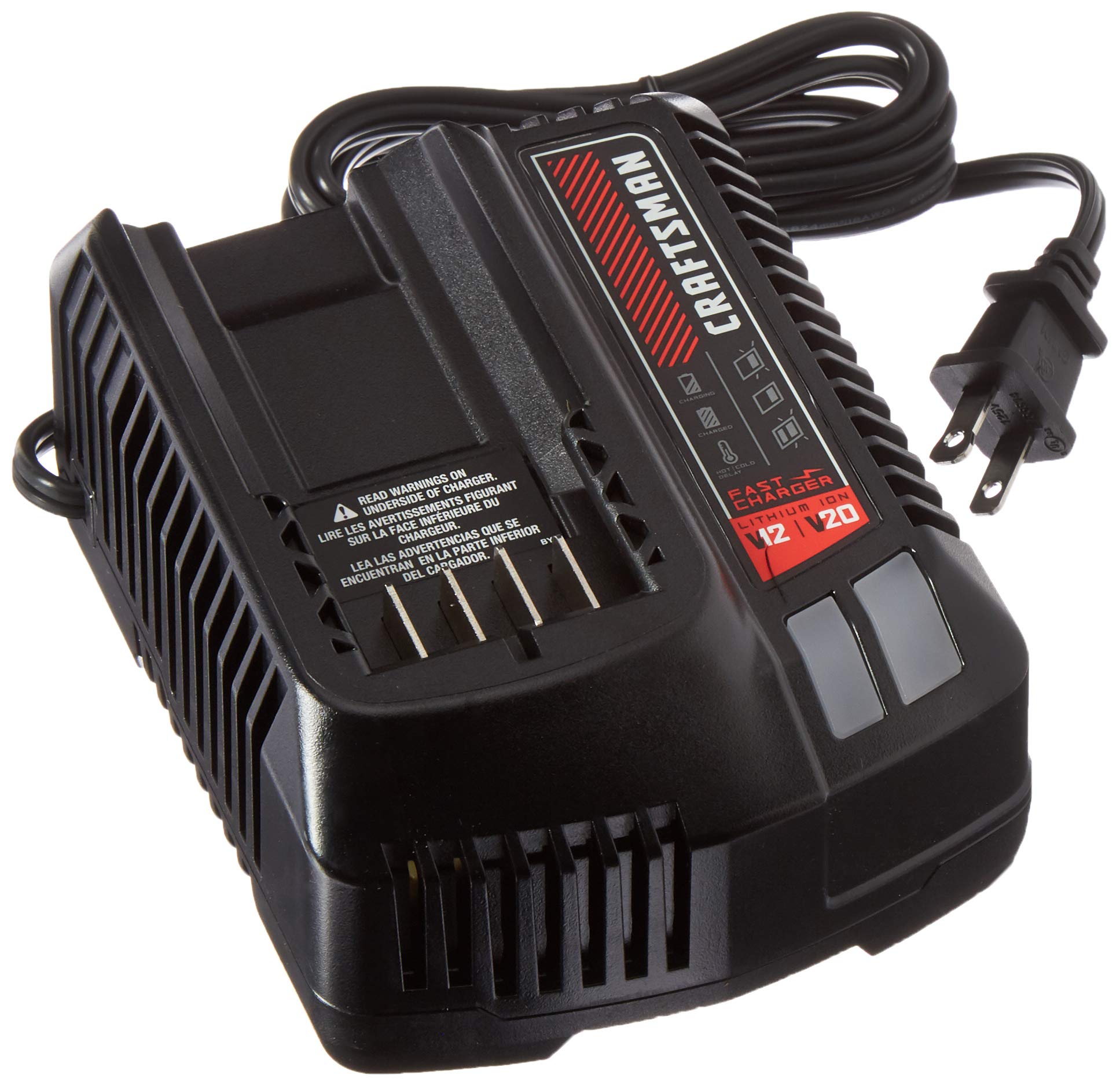
To charge a Craftsman V20 battery, plug the CMCB100 or CMCB201 charger into a standard 120V outlet, slide the battery into the charger until it clicks, and wait for the indicator light to turn green. The 1.5Ah battery charges in about 60 minutes; the 4.0Ah battery takes approximately 2 hours. Charging works between 32°F and 104°F — outside this range, the charger pauses automatically and resumes when temperature normalizes.
Quick Answer
How to charge Craftsman V20 battery: Insert the battery into the Craftsman charger (CMCB100/CMCB201) until it clicks. Plug into a 120V outlet. Red light = charging. Green light = fully charged. Charge time: ~60 min (1.5Ah), ~2 hours (4.0Ah). Store at room temperature, never leave on charger longer than 24 hours after full charge.
Gathering Necessary Tools
Required Tools And Equipment
You need the battery itself and a compatible Craftsman V20 charger. Craftsman makes three charger models for the V20 system:
- CMCB100 — standard charger, 60-min charge time for 1.5Ah
- CMCB201 — fast charger, charges 2.0Ah in approximately 30 minutes
- CMCB104 — 4-port simultaneous charger for job site use
All three are compatible with the full V20 battery range (CMCB201, CMCB202, CMCB204, CMCB206). Do not use third-party chargers — they may not communicate with the battery’s protection circuit and can reduce battery life.
Safety Gear
No special safety gear is required for standard charging. Keep the charger and battery away from water and flammable materials. Do not charge a battery that is physically damaged (cracked casing, bent contacts, or a battery that has been dropped significantly). A damaged Li-ion battery can vent or ignite — if the battery feels unusually hot, smells chemical, or is swollen, do not attempt to charge it.
Preparing The Battery
Check the battery’s fuel gauge before charging. Press the button on the side of the battery — 4 green lights means fully charged, 1–2 lights means below 50%, and 1 blinking light means below 20%. If all lights are off and the button press shows nothing, the battery may have entered deep discharge protection mode.
If the battery has been stored for more than 3 months, let it come to room temperature before charging — a cold battery from a garage in winter will temporarily read lower capacity and may trigger the charger’s temperature protection. Wait 30 minutes at room temperature, then connect to the charger.
Connecting The Charger
Align the battery’s rail with the charger’s slot. Slide the battery forward and down until you feel and hear a firm click. The connection is secure when there is no side-to-side movement. A battery that slides in but does not click may have debris in the contact rail — wipe the contacts with a dry cloth and retry.
Plug the charger into a standard 120V wall outlet. The indicator light activates immediately. If the charger has been unplugged for a while, there may be a 2–3 second delay before the indicator turns on — this is normal while the charger runs its self-test.
Charging Process
Craftsman V20 battery charger instructions — indicator light meanings:
- Solid red: Battery is charging normally
- Solid green: Battery is fully charged — safe to remove
- Flashing red (slow): Battery temperature is outside the safe range (below 32°F or above 104°F) — charger is in standby, will resume automatically
- Flashing red (fast): Battery fault — try removing and reinserting. If the light continues to flash fast, the battery may have a defect
- No light: Check wall outlet; verify battery is fully seated
Charge times by battery capacity: 1.5Ah (CMCB201) ≈ 60 min; 2.0Ah ≈ 90 min; 4.0Ah (CMCB204) ≈ 2 hours; 6.0Ah (CMCB206) ≈ 3 hours. These times are with the standard CMCB100 charger — the fast CMCB201 charger cuts these times roughly in half.
Finalizing Charging
Once the indicator turns solid green, remove the battery promptly — do not leave it on the charger for more than 24 hours after it reaches full charge. The Craftsman charger does have a maintenance mode that prevents overcharging for short periods, but extended time on the charger (days or weeks) accelerates capacity degradation in Li-ion cells. Remove, store at room temperature, and reconnect only when you need to top it off.
Can I Charge A Craftsman Battery Without The Charger?
Technically, yes — but it requires workarounds that carry real risk. The Craftsman V20 battery uses an 18650 Li-ion cell pack running at a nominal 18V (marketed as 20V MAX). If you do not have the Craftsman charger available, here are your options ranked by safety:
- Use any compatible Craftsman V20 charger — all three CMCB models work with all V20 batteries. If a friend or coworker has a Craftsman charger, any of them will work even if it came with a different tool.
- Use a DeWalt 20V MAX charger — DeWalt and Craftsman V20 batteries share the same form factor and voltage range. A DeWalt DCB112 or DCB115 charger will physically fit and charge a Craftsman V20 battery. This works because both are 20V MAX Li-ion systems with the same contact layout. This is not officially endorsed by Craftsman, but it is a widely used workaround with no reported damage.
- Use a universal Li-ion charger — These chargers accept bare cells from 3.6V to 25.9V. You would need to disassemble the battery pack to access the individual cells, which voids the warranty and creates real safety risks if done incorrectly. Not recommended unless you have electronics experience.
- Do not attempt to charge with a car battery, 9V adapter, or any non-Li-ion charger — Li-ion batteries require CC/CV (constant current/constant voltage) charging protocols. Any charger that does not support this will at minimum damage the battery and at worst cause thermal runaway.
Maintenance Tips
Store Craftsman V20 batteries at 40–80% charge when not in use for extended periods. A fully charged or fully discharged battery stored for months degrades faster than one stored at partial charge. Check stored batteries every 3 months and top them off if they have dropped below 2 lights on the fuel gauge. Keep batteries at room temperature (65–75°F) — heat is the fastest way to reduce capacity in Li-ion cells. Never store batteries in a vehicle in summer; trunk temperatures can exceed 130°F.
Clean battery contacts with a dry cloth if you notice intermittent connections or the charger light flickers. Do not use compressed air directly into the charger port — it can push debris deeper into the contacts. A soft toothbrush works well to dislodge sawdust from the battery rail without damaging the contacts.
Troubleshooting
Craftsman V20 battery not charging — common causes and fixes:
- Fast flashing red light: Battery fault. Remove the battery, wait 60 seconds, reinsert. If the fast flash persists, the battery’s BMS (battery management system) has detected a cell fault. If the battery is under warranty (Craftsman offers a 3-year warranty), contact Craftsman support for a replacement.
- Slow flashing red light: Temperature out of range. Move charger and battery to a room between 50–85°F and wait 20 minutes. Do not try to warm a cold battery with a heat gun or oven — rapid temperature changes damage cells.
- No light at all: Check that the wall outlet has power (test with another device). Verify the battery is fully seated — push firmly until it clicks. Try a different outlet. If the charger shows no light on any battery, the charger itself may be defective.
- Battery charges but drains immediately: One or more cells inside the pack have failed. The battery will need to be replaced — individual Li-ion cells in tool batteries are not user-serviceable under warranty.
- Battery won’t reach a full charge (stays at 3 lights): This is normal capacity fade after 2–3 years of use. Li-ion batteries lose approximately 20% capacity after 300–500 full charge cycles. If the battery is only 1–2 years old, it may be a cell imbalance — run the battery completely flat on a tool, then charge from zero to full. This can sometimes re-balance cells and restore a bit of lost capacity.
Frequently Asked Questions
How Do I Charge A Craftsman V20 Battery?
Insert the V20 battery into any Craftsman CMCB100, CMCB201, or CMCB104 charger until it clicks. Plug the charger into a 120V outlet. The indicator turns red while charging and solid green when done. Charge time is 60–120 minutes depending on battery size. Remove the battery once the light is green — do not leave it on the charger indefinitely.
How Long Does It Take To Charge?
With the standard CMCB100 charger: 1.5Ah battery takes about 60 minutes; 2.0Ah takes 90 minutes; 4.0Ah takes 2 hours; 6.0Ah takes about 3 hours. The fast CMCB201 charger cuts these times roughly in half. Always charge from a depleted state — topping off a half-charged battery is faster and takes around half the listed time.
Can I Overcharge My Craftsman V20 Battery?
The charger has automatic shutoff when the battery reaches full charge, so it will not actively overcharge. However, leaving the battery on the charger for days or weeks stresses the cells even in maintenance mode. Remove the battery within a few hours of the green light appearing for best long-term battery health.
Why Won’t My Craftsman V20 Battery Charge?
A fast-flashing red light means the battery’s BMS detected a fault — try removing and reseating the battery. A slow-flashing red light means temperature is out of range (below 32°F or above 104°F) — move to room temperature and retry. No light at all means check the outlet and confirm the battery is fully seated. If the battery is over 3 years old and nothing works, the cells may have reached end of life and the pack needs replacement.
Conclusion
Charging a Craftsman V20 battery is straightforward — insert into the compatible charger, plug in, and wait for green. The most important habits for long battery life are removing the battery once fully charged, storing at 40–80% charge when not in use, and keeping batteries at room temperature. If charging fails, the indicator light pattern tells you exactly what is wrong — a slow flash is a temperature issue, a fast flash is a battery fault, and no light means check your outlet and seating.
Sponsored / affiliate links. As an Amazon Associate I earn from qualifying purchases. I may earn additional commission from eligible campaigns.