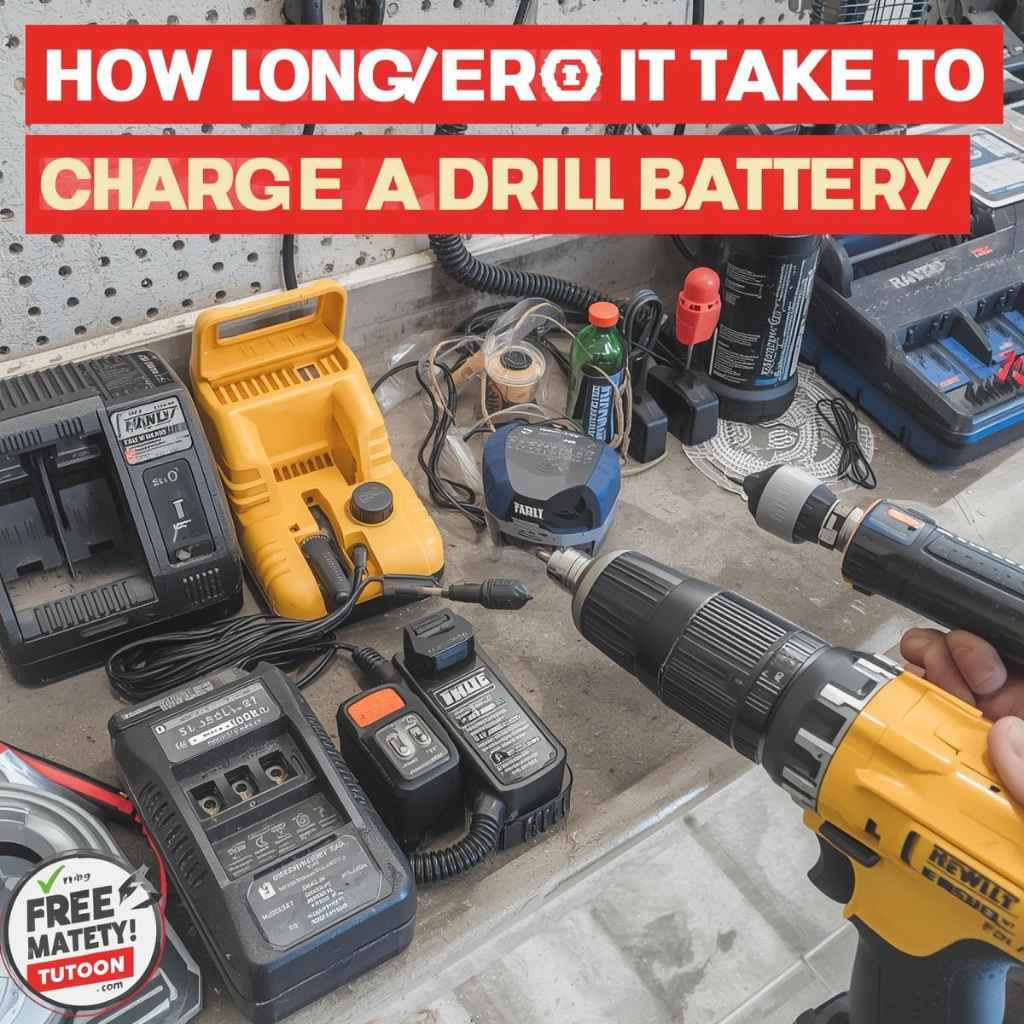
How Long Does It Take To Charge A Drill Battery?
Charging a drill battery typically takes between 30 minutes to 3 hours. This time depends on several key factors like battery capacity (mAh), voltage, the charger’s power output, and the battery’s age and condition. Faster chargers and smaller capacities mean quicker charge times.
Understanding Drill Battery Charging Times
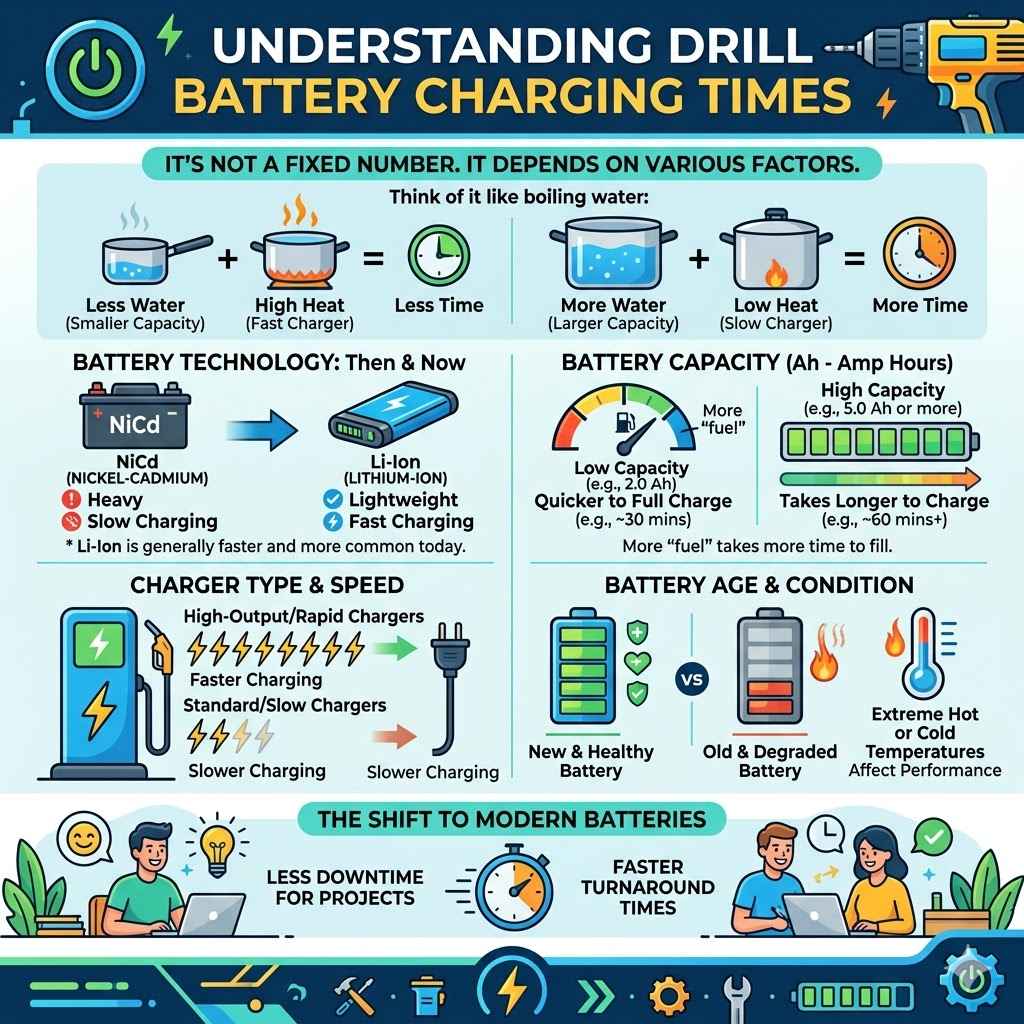
The time it takes to get your drill battery back to full power isn’t a single, fixed number. Many things play a role. Think of it like asking how long it takes to boil water.
It matters how much water you have and how hot your stove is.
Drill batteries have gotten much better over the years. We used to see a lot more heavy, slow-charging types. Now, they’re lighter and often charge up much faster.
This means less downtime for your projects.
But what makes one battery charge faster than another? It’s a mix of science and the tools you use. We’ll break down the main reasons why you might see different charge times.
The Big Players: What Affects Charge Speed
Several main things control how long your drill battery needs to be on the charger. Knowing these can help you understand the times you see.
Battery Capacity (mAh)
This is a big one. Capacity tells you how much energy a battery can hold. It’s measured in milliamp-hours (mAh).
A higher mAh number means the battery can store more power. This is like having a bigger gas tank in your car.
A battery with a larger mAh will naturally take longer to fill up with power. It needs more electricity to reach its full charge. So, a 5.0 Ah battery will take longer than a 2.0 Ah battery.
Think about it this way: filling a bathtub takes longer than filling a small sink. Both use water, but the amount needed is different. Your drill battery works the same way with electricity.
Battery Voltage (V)
Voltage is the “push” of electricity. Higher voltage means more power. Most cordless drills run on voltages like 18V, 20V, or even higher for professional tools.
While voltage doesn’t directly increase charge time like capacity, it’s part of the overall system. A higher voltage battery might be paired with a charger that can deliver power more efficiently, or it might have a larger capacity. It’s more about the system working together.
The voltage rating tells you the battery’s potential power. It’s not the amount of power stored, but the strength of the power it delivers. This influences how quickly the charger can push electrons into the battery.
Charger Type and Power Output
This is where the charger itself really matters. Not all chargers are created equal. Some are basic, slower chargers.
Others are fast chargers designed to get you back to work quickly.
Chargers have a power output rating, often shown in amps (A) or watts (W). A higher output charger can deliver more electricity at once. This speeds up the charging process significantly.
For example, a 2.0 Amp charger will take longer than a 4.0 Amp charger to fill the same battery. The faster charger is like using a wider hose to fill that bathtub. More water flows in at once.
Many brands offer different charger models for their battery lines. You might have a “standard” charger that came with your drill, and then a “rapid” or “super rapid” charger you can buy separately. The rapid ones are key for saving time.
Battery Age and Health
Over time, batteries wear out. This is normal for any rechargeable battery. As a battery gets older, its ability to hold a full charge decreases.
This is called reduced capacity or “battery degradation.”
An older battery might also charge slightly faster because it can’t hold as much power. However, this isn’t necessarily a good thing. A battery that charges too quickly because it’s worn out won’t last as long on a single charge.
Think of an old sponge. It might soak up water quickly, but it can’t hold much. A newer, healthier sponge takes a bit longer to get fully wet, but it holds a lot more water.
The same applies to your drill batteries.
Sometimes, a battery might stop charging altogether. This can happen if the battery is too old, damaged, or if its internal management system has failed.
Charging Environment (Temperature)
Believe it or not, where you charge the battery matters. Batteries, especially lithium-ion ones, have an ideal temperature range for charging. This is usually somewhere between 40°F and 104°F (4°C and 40°C).
If the battery is too cold or too hot, the charger might slow down the charging process. It might even stop charging completely to protect the battery. This is a safety feature built into most modern chargers and batteries.
Charging a battery on a very cold concrete floor in your garage in winter could slow things down. Likewise, leaving a battery in a hot car or direct sunlight on a summer day is a bad idea. It can damage the battery and make charging much slower, or even impossible.
Most chargers have indicator lights that show if the battery is too hot or too cold to charge safely. Always pay attention to these lights.
Common Charge Times for Popular Brands
While every battery and charger combo is a bit different, we can look at typical times for popular tool brands. This gives you a general idea.
Typical Charge Times by Brand (Approximate)
Here’s a quick look at what you might expect. These are for common battery sizes (like 2.0 Ah to 5.0 Ah) using their standard or fast chargers.
| Brand | Common Battery Size | Standard Charger Time | Fast Charger Time |
|---|---|---|---|
| DeWalt | 2.0 Ah | ~60 minutes | ~30 minutes |
| Milwaukee | 5.0 Ah | ~1-2 hours | ~45-60 minutes |
| Makita | 3.0 Ah | ~60 minutes | ~30 minutes |
| Ryobi | 4.0 Ah | ~2 hours | ~60 minutes |
| Ridgid | 2.0 Ah | ~45 minutes | ~30 minutes |
Note: These times are estimates and can vary based on specific charger models and battery health. Always check your tool’s manual for precise information.
DeWalt Charge Times
DeWalt is known for its reliable tools. Their common 20V MAX batteries, especially the 2.0 Ah ones, charge quite quickly with their fast chargers. You might see a 2.0 Ah battery go from empty to full in about 30 minutes with a DCB115 or similar rapid charger.
Their older 18V XRP batteries might take a bit longer.
A larger 5.0 Ah DeWalt battery will naturally take more time. With a standard charger, expect around an hour. With their fastest chargers, you could get it done in about 45 minutes to an hour.
Milwaukee Charge Times
Milwaukee focuses on “M18” systems. Their 18V REDLITHIUM batteries are popular. A smaller 2.0 Ah M18 battery on a Milwaukee M12/M18 rapid charger (like the 48-59-1808) can be ready in around 30 minutes.
For their bigger 5.0 Ah or 6.0 Ah batteries, a standard charger might take well over an hour, maybe even two. But their high-output chargers, like the M18 Super Charger, can fill these larger batteries in roughly 45-60 minutes. It’s impressive how fast they can get.
Makita Charge Times
Makita’s 18V LXT system is widespread. A standard 3.0 Ah 18V LXT battery on a basic charger might take about an hour. However, Makita also has fast chargers, like the DC18RC, that can charge that same battery in about 30 minutes.
If you step up to their larger 5.0 Ah or 6.0 Ah batteries, you’ll see longer times. On a fast charger, a 5.0 Ah battery might be done in about 45 minutes. A standard charger could take closer to 90 minutes or more.
Ryobi Charge Times
Ryobi, found at Home Depot, offers a wide range of batteries for their 18V ONE+ system. Their smaller 1.5 Ah or 2.0 Ah batteries on a standard charger might take around 45-60 minutes. They have “one-hour” chargers that aim to meet this.
For their larger 4.0 Ah or 6.0 Ah batteries, charging times can extend. A standard charger might take 2 hours or more for a 4.0 Ah battery. Ryobi’s “rapid” chargers can cut this down significantly, often to around 60 minutes for a 4.0 Ah pack.
Ridgid Charge Times
Ridgid batteries, often sold at Home Depot as well, are known for their durability. Their 18V batteries come in various sizes. A 2.0 Ah battery on a standard charger might take around 45 minutes.
Their higher-amp chargers can bring this down to about 30 minutes.
Larger Ridgid batteries, like the 4.0 Ah or 6.0 Ah models, will take longer. Expect around 1.5 to 2 hours on a standard charger. A faster charger can often do the job in about an hour to 75 minutes.
My Own Experience with a Dead Battery
I remember one particularly frustrating afternoon a few years back. I was building a deck railing, and I had just finished cutting the last few pieces. I reached for my drill to start screwing them into place, and.
nothing. The battery light was dead. Completely, utterly dead.
My heart sank. I had one battery, and it was the only one I’d brought with me that day. The project screeched to a halt.
I scrambled to find my charger. It was an older model, a standard one that came with the drill years ago. I plugged the battery in, hoping for a quick turnaround.
I sat there, tapping my fingers, watching the charger light blink. It felt like hours. I ended up having to drive to the nearest hardware store to buy a new battery, which cost a small fortune and added a huge delay to my day.
If I’d had a faster charger, or just a spare battery, I wouldn’t have lost all that time and money. That day taught me the real value of understanding battery life and charging.
How to Identify Your Battery & Charger Specs
Knowing what you have is the first step. Look for these details:
- Battery: On the battery itself, you’ll see the voltage (e.g., 18V, 20V MAX) and the capacity (e.g., 2.0 Ah, 5.0 Ah).
- Charger: The charger usually has a model number and sometimes an output rating in Amps (A) or Watts (W).
- Manuals: Your drill’s user manual is the best source for exact charging times and specifications.
Understanding the Charging Process
What actually happens when you plug your battery into the charger? It’s a pretty neat process. Modern chargers are smart.
Lithium-Ion Battery Basics
Most cordless tool batteries today are lithium-ion (Li-ion). These batteries are made up of several smaller cells. Each cell holds energy.
They are popular because they are lightweight, hold a charge well, and don’t have the “memory effect” that older battery types did.
The battery pack has a small circuit board inside. This board manages the charging and discharging. It helps protect the battery from overcharging, overheating, and other issues.
The Role of the Charger
The charger’s job is to provide a controlled flow of electricity to the battery. It’s not just a simple plug. A good charger monitors the battery’s voltage and temperature.
It uses a charging algorithm. This is a set of rules that tells the charger how much power to deliver at different stages. It starts with a “bulk” charge, then moves to an “absorption” charge, and finally a “trickle” or maintenance charge.
Fast chargers use higher currents and more advanced algorithms. They can deliver power much faster without damaging the battery. They do this by carefully managing the heat and the voltage.
Stages of Charging
Most Li-ion charging happens in three main stages:
- Bulk Charge: This is the initial stage where the charger delivers the maximum amount of power the battery can safely accept. The battery voltage rises quickly here.
- Absorption Charge: As the battery gets closer to full, its voltage stops rising as fast. The charger then adjusts to a constant voltage. It delivers less current but ensures the battery fills up completely.
- Float/Maintenance Charge: Once the battery is 100% full, the charger switches to a very low current. This keeps the battery topped off without overcharging it. Some chargers will simply turn off.
Fast chargers are very good at moving through these stages quickly, especially the bulk charge stage, by using higher power output.
Indicator Lights: What Do They Mean?
Chargers use lights to tell you what’s happening. It’s important to know them:
- Solid Green/Red: Battery is fully charged.
- Blinking Green/Red: Battery is charging.
- Alternating/Flashing Lights: Problem. This could mean the battery is too hot, too cold, faulty, or the charger is having an issue.
- No Light: Usually means no power or the battery isn’t seated correctly.
Always refer to your specific charger’s manual for exact light codes.
When to Worry About Charge Times
While understanding typical times is helpful, sometimes a battery charges much faster or slower than it should. This can be a sign of a problem.
Charging Much Faster Than Expected
If your battery, especially a larger capacity one (like 4.0 Ah or 5.0 Ah), suddenly charges in just 10-15 minutes, that’s often a red flag. This usually means the battery’s internal capacity has significantly decreased. It can no longer hold a full charge.
While it’s “charged,” it won’t last very long on the job. It’s a sign that the battery is nearing the end of its life. You might want to consider getting a new one soon.
Charging Much Slower Than Expected
If a battery that used to charge in 45 minutes now takes 3 hours, and the charger isn’t indicating a temperature issue, something might be wrong. This could be a sign of a failing battery cell or an issue with the charger itself.
It’s also possible that the charger is no longer delivering its full power output. If you have another battery that charges normally, that points to the battery being the issue. If multiple batteries charge slowly on the same charger, the charger might be the culprit.
Battery Not Holding a Charge
A battery that charges quickly but then dies after only a few minutes of use is a clear sign of a worn-out battery. It might be accepting a charge, but it can’t deliver the power effectively. This is very common with older batteries.
Charger Not Charging at All
If the charger lights up when you plug it in, but shows an error code or no charging indicator when a battery is attached, check a few things. Make sure the battery is seated firmly. Try a different battery if you have one.
If the problem persists, the charger itself might need to be replaced. Always unplug the charger before inspecting it.
Myth vs. Reality: Battery Charging
- Myth: You need to fully discharge your drill battery before charging to maintain its life.
Reality: This is for older NiCad batteries. Lithium-ion batteries don’t have a memory effect and can be charged anytime. - Myth: Using a faster charger damages the battery.
Reality: Modern fast chargers are designed to safely charge batteries quickly without harm, as long as they are the correct type and in good condition. - Myth: All batteries from the same brand charge at the same speed.
Reality: Charge speed depends heavily on the battery’s mAh capacity and the specific charger model used.
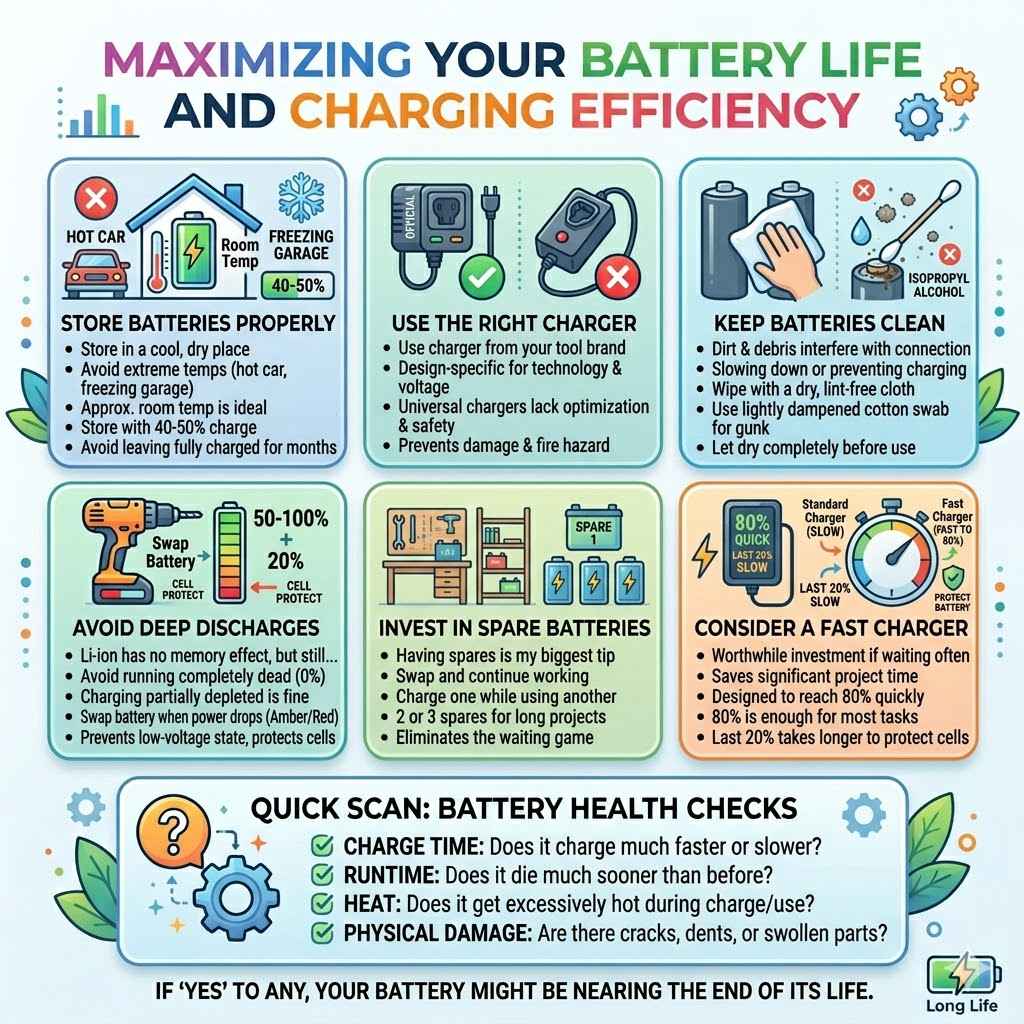
Maximizing Your Battery Life and Charging Efficiency
You can’t always control how fast a battery charges, but you can do things to make sure it lasts longer and charges as well as it can.
Store Batteries Properly
When you’re not using your batteries for an extended period, store them in a cool, dry place. Avoid extreme temperatures. Don’t leave them in a hot car or a freezing garage.
A good storage temperature is around room temperature.
It’s also a good idea to store them with about a 40-50% charge. Fully charging them and leaving them for months isn’t ideal for long-term storage. Most modern batteries have internal systems that prevent complete discharge, but it’s still a good practice.
Use the Right Charger
Always use the charger that came with your tool or an official charger from the same brand. Chargers are designed specifically for the battery technology and voltage of that brand’s tools.
While universal chargers exist, they might not offer the same level of safety or charging optimization. Using a charger not designed for your battery can lead to damage or a fire hazard.
Keep Batteries Clean
Dirt and debris can get into the battery contacts or the charger terminals. This can interfere with the electrical connection, slowing down charging or preventing it altogether.
Wipe the battery terminals and charger contacts with a dry, lint-free cloth occasionally. If there’s stubborn gunk, you can use a cotton swab lightly dampened with isopropyl alcohol, but make sure it dries completely before use.
Avoid Deep Discharges
While Li-ion batteries don’t have a memory effect, it’s still best to avoid running them completely dead every single time. Charging them when they’re partially depleted is fine and can actually be better for their overall lifespan.
If you notice your drill losing power significantly, it’s a good time to swap in a fresh battery or put the current one on the charger. This prevents the battery from going into a very low-voltage state, which can be hard on the cells.
Invest in a Spare Battery (or Two!)
This is my biggest tip from experience. Having at least one spare battery means you can swap it out when the first one dies. You can then charge the depleted battery while you continue working with the fresh one.
For longer projects, two or even three spare batteries can make a huge difference in productivity. It eliminates the waiting game entirely.
Consider a Fast Charger
If you find yourself waiting for batteries often, upgrading to a fast charger from your tool brand is usually a worthwhile investment. The time saved on projects often makes up for the cost.
These chargers are designed to get your batteries to 80% capacity very quickly, which is usually enough to get you back to most tasks. The last 20% takes longer to protect the battery.
Quick Scan: Battery Health Checks
- Charge Time: Does it charge much faster or slower than before?
- Runtime: Does it die much sooner than it used to?
- Heat: Does the battery get excessively hot during charging or use?
- Physical Damage: Are there cracks, dents, or swollen parts?
If you answer yes to any of these, your battery might be nearing the end of its life.
Frequently Asked Questions About Drill Battery Charging
Why is my drill battery charging so slowly?
Slow charging can be due to several things. The battery might have a very high capacity (mAh), meaning it needs more time to fill. The charger itself might be a standard model, not a fast charger.
Battery age and health also play a role; older batteries can sometimes charge slower. Also, very cold or very hot temperatures can cause the charger to slow down for safety.
Can I use a charger from a different brand for my drill battery?
It’s generally not recommended. While some chargers might physically fit, they are designed for specific battery voltages, chemistries, and management systems. Using the wrong charger can damage your battery, void your warranty, or even create a fire hazard.
Always use the charger made for your specific battery system.
How do I know when my drill battery is fully charged?
Most chargers have indicator lights. Usually, a solid green or red light means the battery is fully charged. Some chargers will also beep or shut off automatically.
You can also check your charger’s manual for specific light patterns and meanings.
Is it bad to leave the battery on the charger overnight?
For modern lithium-ion batteries and chargers, it’s generally okay. Most chargers have a maintenance or trickle charge mode that prevents overcharging. However, it’s still best practice to remove the battery once it’s fully charged.
Prolonged storage on the charger, especially in hot conditions, can sometimes reduce the battery’s overall lifespan over the very long term.
What does it mean if my battery charges in minutes?
If a large capacity battery (like 4.0 Ah or more) charges fully in just a few minutes, it’s usually a sign that the battery’s internal capacity has severely degraded. It can no longer hold much of a charge, so it “charges” quickly but won’t last long when you use it. It’s likely time for a replacement.
My charger won’t charge my battery. What should I do?
First, ensure the battery is seated properly in the charger. Check for any debris on the battery terminals or charger contacts and clean them if necessary. Try a different battery if you have one to see if the charger works with another pack.
If it still won’t charge, the battery or the charger might be faulty and may need replacement.
Should I charge my battery every time I use it?
With lithium-ion batteries, you don’t need to wait for them to die before charging. It’s perfectly fine to charge them when they are partially depleted. In fact, avoiding running them completely dead every single time can sometimes help prolong their overall lifespan.
Just charge them when it’s convenient for your workflow.
Conclusion
Understanding drill battery charging times boils down to knowing your battery’s capacity, your charger’s speed, and keeping your gear in good condition. Most modern batteries and fast chargers can get you back to work in under an hour. Paying attention to these details saves you frustration and keeps your projects moving forward.
Sponsored / affiliate links. As an Amazon Associate I earn from qualifying purchases. I may earn additional commission from eligible campaigns.