Best Software for Woodworking in 2026: Free vs. Paid Picks
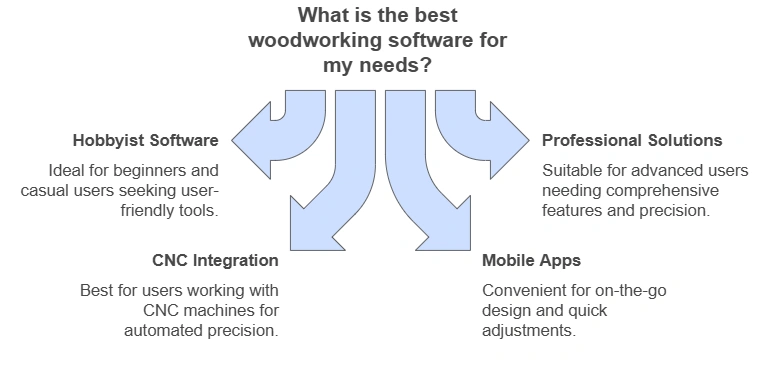
SketchUp is the best all-around software for woodworking — free for personal use, with a learning curve short enough to build a real cut list in a weekend. Fusion 360’s $680-a-year Extension plan wins once a project needs CAD-to-CNC output for a router. Picking the wrong tier wastes weeks relearning a new interface. This guide compares SketchUp, Fusion 360, SketchList 3D, and two free alternatives by price, skill level, and CNC compatibility.
Best Software for Woodworking by Skill Level and Budget
The right woodworking software depends less on which program has the most features and more on how much CAD experience you already have. A beginner who opens Fusion 360 first usually quits within a week; a CNC shop that never leaves SketchUp eventually hits a wall it can’t design around. The table below sorts five real options by the level they actually fit.
| Software | Skill Level | Starting Price | Best For |
|---|---|---|---|
| SketchUp Free | Beginner | $0 (web browser) | Furniture layout, room planning |
| SketchUp Go | Beginner–Intermediate | $129/year | Offline desktop use, larger models |
| SketchList 3D | Intermediate | $250 one-time (V5 Hobby) | Cabinet and furniture cut lists |
| FreeCAD | Intermediate–Advanced | $0, no commercial-use limit | Parametric design on a budget |
| Fusion 360 | Advanced | $680/year (or free for qualifying personal use) | CNC/CAM-ready parts, joinery simulation |
Most hobbyists never need to leave the first two rows. If you’re still deciding what to build before you decide what to design it in, a beginner project list is a faster starting point than any software trial.
Best Design Tablet Pick
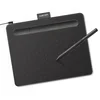 |
Wacom Intuos Small Drawing Tablet – $39.95 None of the software in the table above requires a tablet, but sketching freehand curves for a chair back or a scrolled apron in SketchUp or Fusion 360 is far more natural with a pen than a mouse.
|
As an Amazon Associate we earn from qualifying purchases.
SketchUp vs. Fusion 360 for Woodworking
SketchUp is a push-pull surface modeler — you draw a 2D shape and extrude it into a 3D form, which matches how most woodworkers already think about boards and joints. Fusion 360 is a parametric CAD/CAM package — every dimension is a variable you can edit later, and it exports G-code directly for a CNC router or a laser cutter.
| Feature | SketchUp | Fusion 360 |
|---|---|---|
| Interface | Push-pull, beginner-friendly | Parametric, steeper learning curve |
| CNC/CAM export | Requires a paid plugin | Built in (CAM workspace) |
| File formats | .skp, exports to .dwg, .dae | .f3d, exports to STEP, DXF, G-code |
| Personal-use price | Free (web) or $129/yr (Go) | Free if you qualify, otherwise $680/yr |
If your shop’s only machine is a table saw and a router table, SketchUp’s free tier covers layout and cut lists without a subscription. If you’re running a CNC and need the model to become toolpaths without re-drawing it in a second program, Fusion 360’s CAM workspace is worth the steeper curve.
Free Woodworking Design Software Worth Trying
SketchUp Free runs entirely in a web browser and is the easiest of the free options to learn — no install, and most beginner furniture tutorials online are demonstrated in it. FreeCAD is the more powerful free option: it’s open-source, has no commercial-use restriction, and handles parametric joinery, but its interface is noticeably less polished than SketchUp’s.
A detail most comparison articles skip: Autodesk Fusion for personal use is also free, not just Fusion 360’s 30-day trial. Autodesk grants a renewable 3-year personal-use license to hobbyists who earn under $1,000 a year from their woodworking and use the software for non-commercial home projects — you apply for it directly through Autodesk’s eligibility page. It carries feature restrictions and isn’t meant for client work, but it removes the $680/year barrier for a hobbyist who wants Fusion’s CAM tools without a subscription.
Purpose-Built Cut-List Software: SketchList 3D and PolyBoard
General CAD programs like SketchUp and Fusion 360 weren’t built specifically for woodworking — they were adapted to it. SketchList 3D was built for cabinet and furniture makers from the ground up: draw the piece and it generates a cut list, a shop drawing, and a materials estimate automatically. It sells as a one-time purchase rather than a subscription — $250 for the V5 Hobby tier, $875 for V5 Pro with manufacturing features.
PolyBoard fills a similar niche for cabinetmakers, focused on panel-based cabinet design with automatic hardware placement. Both tools trade the flexibility of a general CAD program for speed on one specific job — going from a cabinet idea to a cut list without manually calculating panel dimensions by hand.
Turning a Digital Plan Into CNC-Ready Cuts
A model on screen and a part that actually fits are two different things. Software with built-in CAM — Fusion 360, or SketchUp with a CAM plugin — converts your 3D model into G-code a CNC router can run directly, skipping the step of re-drawing the part in separate CAM software. For a manual shop, the same design still needs a printed cut list and a tape measure at the saw.

“Software gets you a clean cut list, but boards move with humidity between the day you design a project and the day you cut it. We always re-measure the actual stock at the saw instead of trusting the model’s numbers to the sixteenth.”
📊 Autodesk’s personal-use Fusion license is valid for 3 years and renewable, provided the user earns under $1,000/year from the work — Source: Autodesk, 2026
Mobile Apps for Sketching on the Go
SketchUp’s mobile app and apps like Shapr3D let you rough out a design or check a measurement away from the shop, then sync the file back to a desktop program for the full cut list. They’re a supplement to a full CAD program, not a replacement — screen size limits how much detail is practical to model on a phone.
The video below compares Shapr3D’s mobile-first workflow against SketchUp for furniture design specifically.
Don’t Have a Design Yet? Start With a Plan
Not every project needs custom CAD work. If you’re building something standard, it’s often faster to start from an existing plan than to model one from scratch. Our guide on how to sketch woodworking plans by hand covers the traditional approach for anyone not ready to open CAD software at all, and our library of woodworking project plans and printable PDF plans both give you a cut list without touching a design program. Once you have final dimensions, our shop calculators handle board-footage and cut-optimization math that most software also does, if you’d rather skip the software step entirely.
Frequently Asked Questions
What software do professional woodworkers use?
Professional woodworkers most often use SketchUp for layout and client presentations, and Fusion 360 or Cabinet Vision when the shop runs a CNC router. The choice usually comes down to whether the shop needs CAM output built in, not which program is “better” in the abstract.
Is there free woodworking software available?
Yes. SketchUp Free (browser-based) and FreeCAD (open-source, no commercial-use limit) are both genuinely free. Fusion 360 also offers a free 3-year personal-use license for hobbyists earning under $1,000/year from woodworking, through Autodesk’s eligibility program.
How do I choose woodworking design software?
Match the software to your machinery, not your ambition. If you cut everything by hand or with a table saw, SketchUp’s free tier is enough. If you own or plan to own a CNC router, prioritize a program with built-in CAM, like Fusion 360, so you’re not re-drawing every model in a second application.
Can woodworking software improve project efficiency?
Yes, mainly by generating an accurate cut list before you touch a board, which cuts down on the wasted lumber that comes from measuring mistakes on paper. It doesn’t replace re-checking dimensions against the actual stock at the saw, since lumber moves slightly with humidity after a design is finalized.
Is Fusion 360 really free for hobbyists?
For qualifying users, yes. Autodesk’s personal-use license is free and renewable every 3 years, but it requires under $1,000/year in revenue from the work and is restricted to non-commercial, home-based projects — it’s not available for client or business use.
Conclusion
Start with SketchUp Free if you’re not sure yet — it costs nothing and covers most furniture and cabinet layouts. Move to Fusion 360 only once a CNC router or laser cutter is actually in your shop, since that’s the point where its CAM tools start paying for the steeper learning curve. For projects where you’d rather skip CAD software altogether, our beginner project plans come with the cut list already done.
Sponsored / affiliate links. As an Amazon Associate I earn from qualifying purchases. I may earn additional commission from eligible campaigns.